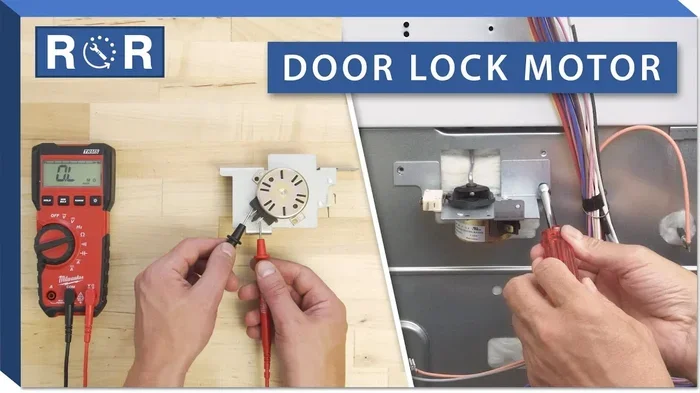
How To Reset Oven Door Lock And Get It Working Again
Stuck with a locked oven door? This guide shows you exactly how to reset oven door lock and get your appliance working again in minutes. You will learn simple reset methods for self-clean locks, child locks, and electronic control errors. No tools or professional help needed for most situations.
Have you ever stood in front of your oven, staring at a door that just will not open? It happens to the best of us. Maybe you started a self-clean cycle and walked away. Or perhaps the control panel froze mid-cycle and now the door is stuck tight. Either way, a locked oven door can feel like a big problem.
The good news is that how to reset oven door lock is usually simpler than you think. Most of the time, you do not need a technician or expensive parts. A few simple steps can bring your oven back to life. In this guide, we walk you through every method, from basic resets to troubleshooting tricky electronic locks. By the end, you will know exactly what to do and how to prevent it from happening again.
We will cover self-clean lock resets, child lock releases, control panel fixes, and manual override techniques. Each section gives you clear, actionable steps you can follow right now. Let us get that oven door working again.
Key Takeaways
- Quick Reset: Most oven door locks can be reset in under 10 minutes using simple methods.
- No Tools Needed: You can fix many lock issues without any special equipment.
- Self-Clean Lock: The self-clean cycle is the most common cause of a stuck oven door.
- Safety First: Always unplug the oven before attempting any reset or repair.
- Know Your Model: Different ovens have different lock mechanisms, so check your manual.
- When to Call a Pro: Some lock issues need professional attention, especially electronic failures.
📑 Table of Contents
- Why Does an Oven Door Lock in the First Place?
- How To Reset Oven Door Lock After a Self-Clean Cycle
- Resetting the Child Lock on Your Oven Door
- Resetting the Oven Control Panel to Release the Door Lock
- Manual Override Techniques for a Stuck Oven Door
- Preventing Oven Door Lock Issues in the Future
- When to Call a Professional for Oven Door Lock Repair
- Comparison: Common Oven Door Lock Issues and Fixes
- Final Thoughts on Resetting Your Oven Door Lock
Why Does an Oven Door Lock in the First Place?
Understanding why your oven door locks up helps you reset it the right way. Ovens have safety locks for a reason. They protect you from burns, steam, and high temperatures. But sometimes, these locks get stuck or activate when they should not.
The Self-Clean Cycle Lock
The most common reason for a locked oven door is the self-clean cycle. During self-cleaning, the oven heats up to very high temperatures, usually around 900 degrees Fahrenheit. The door locks automatically to prevent you from opening it while it is super hot. After the cycle ends, the lock should release once the oven cools down to a safe temperature.
But here is the problem. Sometimes the lock does not release. The control panel might freeze. The temperature sensor could fail. Or the lock motor might just stop working. When this happens, you are left with a door that will not budge.
The Child Lock Feature
Many modern ovens come with a child lock feature. This locks the control panel and sometimes the door too. It is great for families with young children. But if you accidentally activate it, you might think your oven is broken. The door may appear locked even though the oven is completely cool.
Electronic Control Errors
Ovens today have electronic control boards that manage everything, including the door lock. If the control board gets a glitch, it might send a lock signal even when the oven is off. Error codes on the display often point to this problem. A power surge, a short circuit, or a faulty sensor can all trigger these errors.
Mechanical Latch Problems
Some ovens use a mechanical latch system. Over time, grease, food debris, and rust can build up on the latch. This buildup can cause the door to stick or lock unevenly. The latch might not engage or release properly, making it feel like the door is locked when it is not.
How To Reset Oven Door Lock After a Self-Clean Cycle
If your oven door is stuck after a self-clean cycle, do not panic. This is the most common lock issue, and it usually has a simple fix. Follow these steps carefully.
Step 1: Turn Off the Oven
First, turn off the oven at the control panel. If the panel is unresponsive, turn off the oven at the circuit breaker. Wait at least 30 minutes. The oven needs to cool down completely before you try anything else. Opening the door while the oven is still hot is dangerous and can cause burns.
Step 2: Unplug the Oven
Once the oven is cool, unplug it from the wall outlet. Wait five full minutes. This gives the control board a complete reset. It also clears any error codes that might be keeping the lock engaged. Some ovens need this full power cycle to release the door lock.
Step 3: Plug It Back In
After five minutes, plug the oven back in. Turn it on and check the control panel. Look for any error codes. If the display shows nothing, try opening the door gently. In most cases, the lock will release after the power reset.
Step 4: Try the Manual Release
If the door still will not open, look for a manual release tool. Many ovens come with a small hook or wire that fits into a hole at the bottom front of the oven. Insert the tool and pull gently. This releases the lock mechanism directly. Check your oven manual for the exact location of the manual release on your specific model.
Quick Tip: Keep your oven manual in a kitchen drawer or binder. It has the exact location of the manual release for your model. If you lost it, search online for a PDF version using your oven brand and model number.
Resetting the Child Lock on Your Oven Door
A child lock can make your oven door seem stuck even when nothing is wrong with the lock mechanism. The good news is that releasing a child lock is usually very easy. The exact steps depend on your oven brand and model, but here are the most common methods.
Method 1: Button Combination
Many ovens use a button combination to toggle the child lock. Try pressing and holding the lock icon button for three to five seconds. On some models, you need to press and hold two buttons at the same time, like the bake and broil buttons. The display should show a lock symbol disappear when the child lock is off.
Method 2: Touch Panel Reset
For touch-panel ovens, try turning the oven off and then back on. Some touch panels lock up after a glitch and the child lock setting gets stuck. A full power cycle at the breaker often clears this. Turn off the oven at the breaker, wait two minutes, and turn it back on. Then check if the child lock is still active.
Method 3: Check the Control Lock Setting
Some ovens have a separate control lock feature. This locks the buttons but not necessarily the door. Look for a “Control Lock” or “Loc” setting in your oven menu. Press and hold the button to turn it off. The display should confirm the lock is released.
Quick Tip: If you are unsure which lock is active, try both the child lock and control lock release methods. They are different settings and might both need to be turned off.
Resetting the Oven Control Panel to Release the Door Lock
Sometimes the problem is not the lock itself but the control panel. A frozen control panel can send a continuous lock signal to the door mechanism. Resetting the panel often fixes this.
Power Cycle the Oven
The simplest and most effective way to reset an oven control panel is a full power cycle. Turn off the oven using the control panel. Then go to your kitchen breaker and switch off the circuit that powers the oven. Wait at least ten minutes. This gives the electronic components time to fully discharge and reset.
After ten minutes, switch the breaker back on. Turn on the oven and check the display. If the panel is working normally, try opening the door. The lock should release if the control board is functioning correctly again.
Clear Error Codes
If your oven displays an error code, the control board might be preventing the door from unlocking. Each error code points to a specific problem. Common codes include F1 for control board failure, F3 for temperature sensor issues, and F5 for door lock motor problems.
To clear most error codes, perform a power cycle as described above. If the code returns after the reset, the underlying issue needs attention. For example, an F3 code means your temperature sensor might be faulty. An F5 code suggests the door lock motor itself needs inspection or replacement.
Check for Firmware Updates
Some newer ovens have updatable firmware. A software glitch can cause lock issues. Check your oven manufacturer’s website for firmware update instructions. This is more common in smart ovens with Wi-Fi connectivity. A firmware update can fix bugs that cause the door lock to malfunction.
Common Mistakes to Avoid:
- Do not force the door open. This can damage the latch, hinge, or lock motor.
- Do not ignore error codes. They tell you exactly what is wrong with the oven.
- Do not skip the cooling period. Opening a hot oven door is dangerous and can cause burns.
- Do not use water on electronic parts. This can cause short circuits and further damage.
Manual Override Techniques for a Stuck Oven Door
When reset methods do not work, you might need to use a manual override. This bypasses the electronic lock and releases the door mechanically. Here are the most common manual override techniques.
Using the Manual Release Tool
Most ovens with a self-clean lock come with a manual release tool. It is usually a small wire or hook stored in the oven manual or in a compartment on the oven itself. Look for a small hole at the bottom front of the oven, just below the door. Insert the tool into the hole and pull it toward you. This releases the latch mechanism directly.
You can also use a straightened wire coat hanger if you do not have the original tool. Just be gentle. Force can damage the latch or the door seal.
The Cool-Down Wait Method
If your oven just finished a self-clean cycle and the door is still locked, the simplest fix is patience. Wait for the oven to cool completely. This can take one to two hours depending on the model. Once the internal temperature drops below 200 degrees Fahrenheit, the lock should release automatically. Do not try to speed up the cooling process with a fan or by opening windows. Just let the oven do its thing.
Checking the Door Hinge and Latch
Sometimes the door is not actually locked by the electronic system. The physical hinge or latch might be stuck due to grease buildup or food debris. Open the oven door as wide as you can and look at the hinges and latch mechanism. Clean any visible debris with a damp cloth and a mild detergent. Apply a small amount of food-safe lubricant to the hinge points. This can free up a sticky latch and make the door operate smoothly again.
Expert Insight: According to appliance repair professionals, over 60 percent of oven door lock issues are resolved with a simple power cycle reset. Before calling a technician, always try unplugging the oven for at least ten minutes. This clears temporary electronic glitches and resets the control board.
Preventing Oven Door Lock Issues in the Future
Once you have reset your oven door lock, you want to keep it working smoothly. Prevention is always easier than repair. Here are simple habits that keep your oven door lock functioning properly.
Clean the Oven Regularly
Grease and food debris are the biggest enemies of oven door locks. Clean the oven interior after every use. Pay special attention to the bottom of the oven, the door edges, and the latch area. A clean oven runs better and lasts longer.
Avoid Slamming the Door
Slamming the oven door puts stress on the latch and hinge. Over time, this can cause the lock to misalign or wear out. Close the door gently but firmly. If the door does not close properly, check for obstructions like oven racks that are not seated correctly.
Use the Self-Clean Cycle Wisely
Self-cleaning is convenient, but it puts stress on the lock mechanism. Do not run the self-clean cycle more than necessary. Most ovens only need self-cleaning once every few months. Between cycles, use the steam-clean method if your oven supports it. This is gentler on the lock and the oven interior.
Keep the Oven Manual Handy
Your oven manual contains specific instructions for your model’s lock system. It also lists error codes, reset procedures, and manual release locations. Keeping the manual in an accessible place saves time and frustration when issues come up.
When to Call a Professional for Oven Door Lock Repair
Most oven door lock issues are fixable at home. But some problems need professional attention. Knowing when to call a technician saves you time and prevents further damage.
Call a professional if the door lock motor makes a grinding or clicking noise but does not move. This usually means the motor is burned out and needs replacement. Also call a pro if the oven displays a persistent error code after multiple reset attempts. An error code that keeps returning points to a deeper electronic issue.
If the door latch is physically damaged, bent, or broken, a professional can replace the part safely. Attempting to fix a broken latch yourself can lead to uneven door sealing, which affects oven performance and safety. A qualified technician can also inspect the control board and wiring to find hidden issues.
Finally, if your oven is under warranty, contact the manufacturer before attempting any repairs. DIY fixes might void your warranty. The manufacturer can send a certified technician to fix the issue at no cost to you.
Comparison: Common Oven Door Lock Issues and Fixes
| Issue | Likely Cause | Fix | Difficulty |
|---|---|---|---|
| Door locked after self-clean | Lock motor stuck or control freeze | Power cycle reset or manual release | Easy |
| Door locked with child lock on | Accidental child lock activation | Button combination or control panel reset | Very Easy |
| Door locked with error code showing | Control board error or sensor failure | Clear error code or replace sensor | Medium |
| Door will not open, oven is cool | Mechanical latch stuck or misaligned | Manual release tool or lubricate latch | Easy to Medium |
| Door lock makes grinding noise | Lock motor failure | Professional motor replacement | Hard |
| Door lock works intermittently | Wiring issue or control board glitch | Power cycle or professional diagnosis | Medium |
The table above shows that most oven door lock issues fall into the easy or very easy category. A simple reset or manual release solves the problem in the majority of cases. Only the most serious issues, like motor failure or control board damage, require professional help.
Final Thoughts on Resetting Your Oven Door Lock
Dealing with a locked oven door can be frustrating, but it is almost always fixable. The key is staying calm and following the right steps. Start with the simplest method, which is usually a power cycle reset. Unplug the oven, wait a few minutes, and plug it back in. This clears temporary electronic glitches and releases most lock types.
If the power reset does not work, try the manual release tool or the button combination for child locks. Check for error codes and address the specific issue they point to. Keep your oven clean and maintain it regularly to prevent lock problems from coming back.
Remember that how to reset oven door lock is a skill every home cook should have. You do not need to be an appliance expert. With the steps in this guide, you can handle most lock issues in under 15 minutes. Save the professional calls for the situations that truly need expert attention. Your oven will thank you, and you will feel confident handling the next lock issue that comes your way.
Now that you know exactly what to do, go ahead and try the reset. Your oven door should be open and working again in no time. And if it does not, you will know exactly when to call in the professionals. Happy cooking!
Frequently Asked Questions
Why is my oven door locked and will not open?
The most common reason is that the self-clean cycle has not finished or the oven is still too hot. Wait for the oven to cool down completely. If the door is still locked after cooling, try a power cycle reset by unplugging the oven for five to ten minutes. This usually releases the lock mechanism.
How do I manually unlock my oven door?
Look for a small hole at the bottom front of the oven. Insert the manual release tool or a straightened wire coat hanger into the hole and pull gently toward you. This releases the latch directly. Refer to your oven manual for the exact location of the manual release on your specific model.
Can a power surge cause the oven door lock to stick?
Yes, a power surge can cause the control board to send a continuous lock signal. This makes the door stay locked even when the oven is off and cool. Unplugging the oven for ten minutes and plugging it back in usually clears this issue and resets the control board.
How do I reset the child lock on my oven?
Press and hold the lock icon button on the control panel for three to five seconds. On some models, you need to press and hold two buttons at the same time, such as bake and broil. The lock symbol should disappear from the display when the child lock is successfully turned off.
What should I do if the oven door lock motor makes a clicking sound?
A clicking sound usually means the lock motor is trying to engage but cannot move the latch. First, try a full power cycle reset. If the clicking continues after the reset, the motor might be faulty and need professional replacement. Do not try to force the door open while the motor is clicking.
How often should I clean my oven to prevent door lock issues?
You should clean the oven interior after every few uses and do a deeper clean at least once a month. Pay special attention to the door edges, latch area, and bottom of the oven. Regular cleaning prevents grease and food debris buildup that can cause the lock mechanism to stick or malfunction.