How To Program Your Mueller Coffee Maker Like A Pro
Programming your Mueller coffee maker is simple once you understand the buttons and settings on your machine. This guide walks you through every step, from initial setup to using the delay brew timer like a pro. You will learn how to customize your morning cup, adjust brew strength, and keep your programmable coffee machine running smoothly for years.
Key Takeaways
- Easy Setup: Programming your Mueller coffee maker takes just a few minutes and no technical skills.
- Delay Brew Feature: Set your coffee to start brewing hours before you wake up for a fresh cup every morning.
- Customizable Strength: Adjust brew strength settings to match your personal taste preferences perfectly.
- Maintenance Matters: Regular cleaning and decalcifying keep your programmable coffee machine running at its best.
- Common Issues Are Fixable: Most programming problems have simple solutions you can handle at home.
- Fresh Beans Make Better Coffee: Using freshly ground beans enhances the flavor of every programmed brew cycle.
📑 Table of Contents
- What Is a Mueller Coffee Maker and Why Should You Program It?
- Getting Started: Initial Setup and Controls
- How To Program Your Mueller Coffee Maker Step by Step
- Advanced Programming Tips and Tricks
- Troubleshooting Common Programming Issues
- Maintaining Your Programmable Mueller Coffee Maker
- Final Thoughts
What Is a Mueller Coffee Maker and Why Should You Program It?
A Mueller coffee maker is a programmable drip coffee machine designed for home use. It comes with features like a delay brew timer, adjustable strength settings, and an auto shut-off function. These machines are popular because they make great coffee without requiring constant attention.
Programming your coffee maker means setting it up so it brews automatically at a time you choose. Think about it. You wake up, and the smell of fresh coffee fills your kitchen. No rushing. No waiting. Just a perfect cup ready when you need it.
The Mueller programmable coffee machine gives you control over brew time, temperature, and strength. Once you learn how to use these settings, your morning routine becomes easier and more enjoyable. You will wonder how you ever managed without it.
Programming your coffee maker also saves time during busy mornings. Instead of standing over the machine measuring grounds and pressing buttons, you set everything the night before. When your alarm goes off, coffee is already brewing. This small change can make a big difference in your day.
Who Benefits Most From Programming?
Anyone who drinks coffee daily benefits from programming their machine. But it is especially helpful for people with busy schedules, parents getting kids ready for school, or anyone who wants a consistent cup every single morning. The auto brew feature on Mueller machines makes it possible for anyone to enjoy barista-quality coffee at home.
Getting Started: Initial Setup and Controls
Before you start programming, you need to set up your Mueller coffee maker correctly. The initial setup only takes a few minutes, but it ensures everything works smoothly from day one.
Unboxing and Parts Overview
When you open your Mueller coffee maker box, you will find the main unit, a glass carafe, a reusable filter basket, and a measuring scoop. Some models also include a charcoal water filter. Make sure all parts are present before you begin.
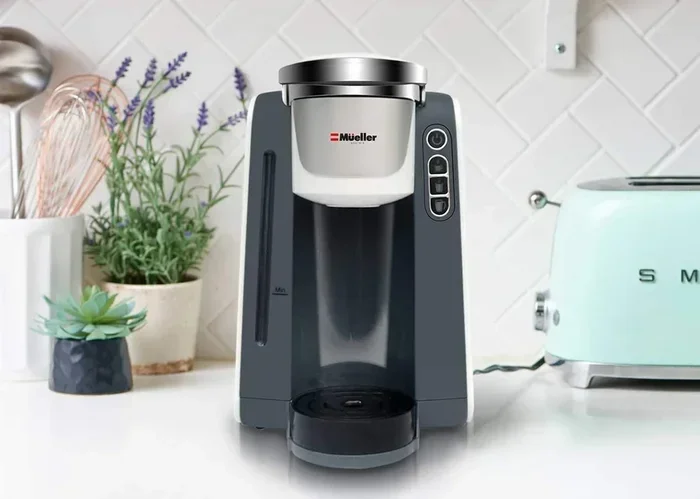
The control panel is usually located on the top or front of the machine. It includes buttons for programming, brewing, and adjusting settings. Most Mueller models have a clear LCD or LED display that shows your programmed time and settings.
Basic Controls Explained
Here are the main controls you will find on a Mueller coffee maker:
- Program Button: This is the key button for setting your auto brew timer.
- Brew Button: Starts a manual brew cycle immediately.
- Strength Selector: Lets you choose between regular and bold coffee.
- Clock Button: Sets the current time on the display.
- Auto On/Off Toggle: Enables or disables the programmable timer function.
Take a moment to press each button and see what it does. There is no harm in exploring. Getting familiar with the controls now makes programming much easier later.
First-Time Water and Filter Setup
Fill the water reservoir with cold, filtered water. Do not overfill past the maximum line. Insert the reusable filter basket into the holder and place a paper filter inside if your model requires one. Add your coffee grounds. A good rule of thumb is two tablespoons of grounds per six ounces of water.
For the best flavor, use freshly ground coffee beans. The coffee grounds freshness matters a lot for taste. If you grind your own beans, try to use them within a few days of grinding for the richest flavor possible.
How To Program Your Mueller Coffee Maker Step by Step
Now for the part you have been waiting for. Programming your Mueller coffee maker is straightforward once you follow these steps. The process is similar across most Mueller programmable models, so these instructions should apply to your machine.
Step 1: Set the Clock
Press the clock button. Use the hour and minute buttons to set the current time. Make sure you select AM or PM correctly. The display will show the time you have set. This is the foundation for everything else.
Getting the clock right is essential. If your clock is off by even 30 minutes, your coffee will brew at the wrong time. Take your time with this step. A correct clock setting means your delay brew timer works perfectly every morning.
Step 2: Choose Your Brew Time
Press the program button. The display will start flashing, indicating it is ready for you to set the brew time. Use the hour and minute buttons to choose when you want your coffee to start brewing.
For example, if you want coffee ready at 7:00 AM and it is currently 10:00 PM, set the program timer for 7:00 AM. The machine will turn on automatically and begin brewing at that time. This is the magic of the programmable coffee machine feature.
Step 3: Select Your Brew Strength
Most Mueller coffee makers have a strength selector. You can usually choose between regular and bold settings. The bold setting uses a slightly longer brew time and more water contact with the grounds, resulting in a stronger cup.
If you like mild coffee, stick with the regular setting. If you prefer a robust, full-bodied flavor, choose bold. You can also experiment with the amount of coffee grounds you use. More grounds equals stronger coffee regardless of the strength setting you choose.
Step 4: Add Water and Grounds
Fill the reservoir with the right amount of water for the number of cups you want. Place your coffee filter in the basket and add the grounds. Do not overfill the filter basket. Too many grounds can cause overflow or clog the machine.
For the best results, use quality coffee beans and grind them just before brewing. The flavor difference is noticeable. If you buy pre-ground coffee, store it in an airtight container to preserve freshness.
Step 5: Press Program to Save
Once you have set the time, strength, and added your water and grounds, press the program button again to save your settings. The display will stop flashing and show the programmed time. Your Mueller coffee maker is now ready to brew automatically.
In the morning, you will hear the machine start brewing at your set time. The auto brew feature takes care of everything. When the cycle is complete, the machine will usually beep to let you know your coffee is ready.
Quick Tips for Programming Success
- Always set the clock first before programming the brew time.
- Use fresh, cold water for the best tasting coffee.
- Clean your machine weekly to prevent buildup that affects flavor.
- Set your program timer the night before for a stress-free morning.
- Experiment with different coffee-to-water ratios to find your perfect cup.
Advanced Programming Tips and Tricks
Once you have the basics down, you can explore advanced features that make your Mueller coffee maker even more convenient. These tips help you get the most out of your programmable machine.
Using the 24-Hour Programmable Timer
The 24-hour timer lets you set a brew time up to 24 hours in advance. This is perfect for weekends when you sleep in or for hosting guests. You can prepare the night before and wake up to the aroma of fresh coffee without lifting a finger.
Here is a practical example. Say you have friends coming over at 8:00 AM. Set your timer at 7:30 AM the night before. When they arrive, a fresh pot of coffee is waiting. Your guests will think you are a coffee genius.
Customizing Brew Temperature
Some Mueller models allow you to adjust the brewing temperature. The ideal brewing temperature for coffee is between 195 and 205 degrees Fahrenheit. If your machine has temperature controls, experiment to find the setting that produces the best flavor for your taste.
Higher temperatures extract more flavor but can also bring out bitterness. Lower temperatures produce a smoother cup but may taste under-extracted. Finding the sweet spot is all about personal preference.
Making Iced Coffee With Your Programmer
You can also use your programmed brew cycle to make iced coffee the night before. Set your Mueller machine to brew a full pot in the morning, then pour it over ice. For a more flavorful iced coffee, brew it strong and add cold water or milk after cooling.
If you want to try making Dunkin-style iced coffee at home, programming your Mueller machine to brew a strong batch early in the morning gives you the base you need. Add milk, sweetener, and ice, and you have a refreshing drink ready in minutes.
Programming Multiple Brew Cycles
Some advanced users program their Mueller machines for multiple brew cycles throughout the day. This works well for households where people drink coffee at different times. You can set a morning brew and an afternoon brew to keep everyone happy.
Keep in mind that not all Mueller models support multiple programmable cycles. Check your user manual to see what your specific model can do. The coffee maker manual is your best resource for unlocking all the features.
Troubleshooting Common Programming Issues
Even the best programmable coffee makers can have occasional issues. Most programming problems are easy to fix without calling a technician. Here are the most common issues and how to solve them.
The Machine Will Not Program
If your Mueller coffee maker will not enter programming mode, the first thing to check is the power connection. Make sure the machine is plugged in and the outlet is working. Also check that the carafe is seated properly on the warming plate. Many models will not program if the carafe is not in place.
Try resetting the machine by unplugging it for 30 seconds and plugging it back in. This simple reset often clears any error codes or frozen settings. After plugging it back in, set the clock again and try programming from the beginning.
The Timer Resets After Power Outage
If the power goes out, your programmed settings may reset. This is normal for most programmable coffee makers. After the power returns, you will need to reset the clock and reprogram your brew time.
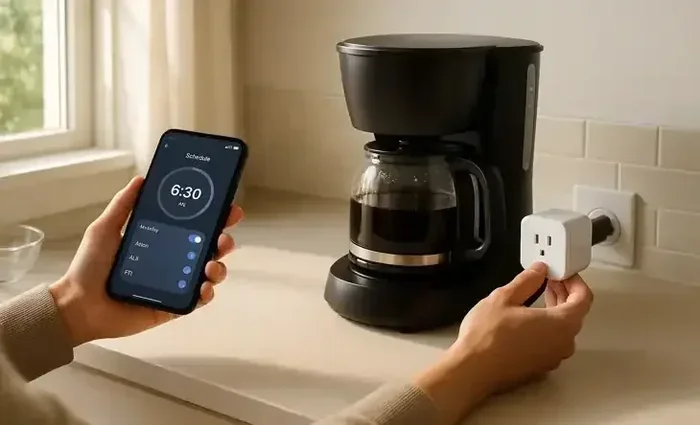
To avoid this frustration, consider plugging your coffee maker into a surge protector with battery backup. This keeps the clock running during brief power outages and preserves your programmed settings.
The Coffee Tastes Weak or Strong
If your programmed coffee does not taste right, the issue is usually with the grounds-to-water ratio or the grind size. Try adjusting the amount of coffee grounds you use. More grounds make stronger coffee. Less grounds make it milder.
Also consider whether your coffee beans are fresh. Old or stale grounds produce weak, flat-tasting coffee. For the best results, grind your beans just before brewing and store unused beans in an airtight container away from light and heat.
The Machine Beeps But Does Not Brew
This issue usually means the water reservoir is empty or the filter basket is not seated correctly. Check that there is enough water in the reservoir and that the filter basket is properly locked in place. Clean any coffee residue that might be blocking the brew head.
Maintaining Your Programmable Mueller Coffee Maker
Regular maintenance keeps your Mueller coffee maker performing at its best. A well-maintained programmable coffee machine brews better coffee and lasts longer. Here is how to keep yours in top shape.
Daily Cleaning Routine
After each use, remove the used coffee grounds from the filter basket. Rinse the carafe with warm, soapy water and wipe it dry. Wipe down the exterior of the machine with a damp cloth. These simple steps take less than two minutes and keep your machine looking and working great.
Weekly Deep Cleaning
Once a week, remove the filter basket and wash it thoroughly with warm water and mild dish soap. Clean the water reservoir with a mixture of vinegar and water to remove mineral buildup. Rinse everything well and let it air dry before reassembling.
For machines that are heavily used, consider decalcifying your coffee maker every month. Decalcifying removes calcium and mineral deposits that build up inside the machine over time. This process improves brew temperature and keeps your coffee tasting fresh.
Replacing Filters and Parts
Replace your charcoal water filter every two months or as recommended by the manufacturer. Check the power cord for any signs of wear or damage. Inspect the carafe for cracks, as a cracked carafe can cause leaks or affect the warming function.
Using genuine Mueller replacement parts ensures the best fit and performance. Third-party parts may not work as well and could void your warranty. Check your user manual or the Mueller website for compatible replacement parts.
When To Replace Your Coffee Maker
Even with excellent care, coffee makers do not last forever. Most programmable drip machines last between 5 and 8 years with regular use. If you notice consistent problems like uneven brewing, leaking, or the machine failing to maintain temperature, it may be time to replace your unit.
Before buying a new one, try the troubleshooting steps mentioned earlier. Sometimes what seems like a serious problem is just a simple fix. And if you do need a new machine, look for models with the same programmable features you love.
Final Thoughts
Programming your Mueller coffee maker is one of the best ways to improve your morning routine. The auto brew feature and delay brew timer give you fresh coffee exactly when you want it. With just a little practice, you will be programming like a pro in no time.
Remember to use fresh, quality beans for the best flavor. Keep your machine clean and well-maintained. Experiment with strength settings and brew times until you find your perfect combination. The more you use your programmable coffee machine, the more you will appreciate how easy and convenient it is.
Start with the basic programming steps covered in this guide. Then explore the advanced features as you become more comfortable with your machine. Before long, you will not be able to imagine starting your day without that perfectly timed, perfectly brewed cup of coffee waiting for you in the kitchen.
Take action today. Set your Mueller coffee maker, enjoy your morning routine, and taste the difference that a well-programmed brew makes. Your future self will thank you every single morning.
Frequently Asked Questions
How long does it take to program a Mueller coffee maker?
Programming your Mueller coffee maker takes about 5 minutes the first time. Once you are familiar with the controls, you can set it up in under 2 minutes. The clock setting is the most important step, so take your time with that part.
Can I program my Mueller coffee maker to brew at night?
Yes, you can set the programmable timer for any time within the 24-hour window. However, most people prefer brewing in the morning. If you set it for nighttime, make sure the carafe is clean and the warming plate is functioning properly.
Why does my programmed coffee taste different each time?
Inconsistent taste usually comes from changes in coffee grounds, water quality, or grind size. Use fresh beans and filtered water for the most consistent results. Also check that your machine is clean and free of mineral buildup.
Can I use my Mueller coffee maker without programming it?
Absolutely. The programming feature is completely optional. You can use your Mueller coffee maker just like a regular drip machine by pressing the brew button manually whenever you want a cup.
How often should I decalcify my Mueller coffee maker?
You should decalcify your machine every 1 to 3 months depending on how hard your water is. If you notice slower brewing or unusual sounds, it may be time to descale. Regular decalcifying keeps your programmable coffee machine running smoothly.
What is the difference between regular and bold programming settings?
The regular setting uses a standard brew cycle with normal water flow. The bold setting extends the brew time slightly and increases water contact with the coffee grounds, resulting in a stronger, more intense flavor. Choose bold if you prefer a richer cup of coffee.