How To Use Your Chefman Digital Air Fryer Like A Pro
Our guide walks you through everything you need to know about using your Chefman Digital Air Fryer with confidence. You will learn how to set the right temperature, use preset functions, and get crispy results every time. We also share cleaning tips and common mistakes to avoid so your air fryer lasts for years.
There is something really satisfying about pulling a batch of crispy, golden fries or perfectly cooked chicken out of your Chefman Digital Air Fryer. Whether you are a beginner in the kitchen or a seasoned home cook, this appliance can change the way you prepare meals. It uses hot air to cook food, which means you get that crispy texture without drowning everything in oil.
But here is the thing. A digital air fryer comes with buttons, presets, and settings that can feel a little confusing at first. You might wonder what temperature to use, how long to cook certain foods, or how to get the best results every single time. That is exactly why we put this guide together.
In this article, we will walk you through everything you need to know about using your Chefman Digital Air Fryer like a pro. From the first unboxing to everyday cooking and cleaning, we have you covered. You will learn practical tips, discover common mistakes to avoid, and walk away with the confidence to cook almost anything in your air fryer. Let us get started.
Key Takeaways
- Know Your Controls: Understanding the digital display and preset buttons makes cooking faster and easier.
- Preheat for Best Results: Always preheat your Chefman Digital Air Fryer for 3-5 minutes before adding food.
- Don’t Overcrowd the Basket: Leaving space around food ensures even cooking and maximum crispiness.
- Clean After Every Use: Regular cleaning prevents grease buildup and keeps your air fryer performing well.
- Use the Right Temperature: Most foods cook well between 350°F and 400°F in a digital air fryer.
- Shake or Flip Midway: This simple step gives you evenly cooked, golden-brown food every time.
📑 Table of Contents
Understanding Your Chefman Digital Air Fryer
Before you start cooking, it helps to know what you are working with. The Chefman Digital Air Fryer is designed to be simple and user-friendly. But knowing the basics of how it works will make a big difference in your cooking results.
What Makes It Digital
Unlike older analog air fryers with simple dials, a digital air fryer gives you precise control over temperature and cooking time. The digital display lets you set exact temperatures and countdown timers. This means less guesswork and more consistent results. You can also save custom settings on some models, which is a great feature for foods you cook often.
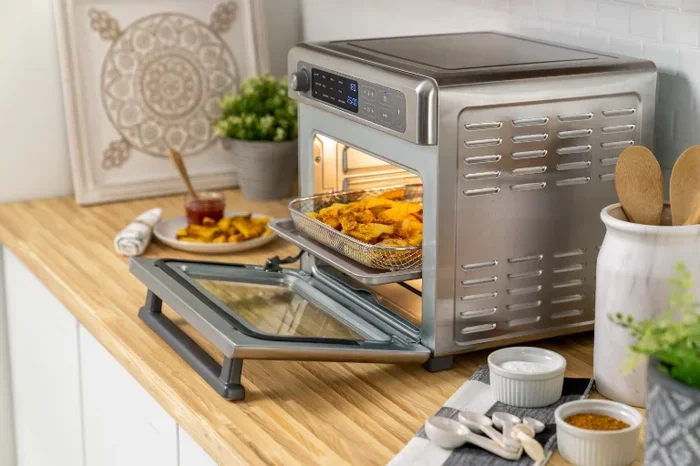
The digital controls on the Chefman Digital Air Fryer typically include a temperature display, a time display, and preset buttons for common foods. These presets are pre-programmed with the ideal settings for things like french fries, chicken, fish, and desserts. They take the guesswork out of cooking and help you get great results right away.
Key Parts and Components
Familiarizing yourself with the main parts of your Chefman Digital Air Fryer will help you use it more effectively. Here are the key components you should know:
- The Basket: This is where your food goes. It has holes or slots that let hot air circulate around the food for even cooking.
- The Heating Element: Located at the top of the unit, this is what generates the hot air that cooks your food quickly.
- The Fan: The fan circulates the hot air rapidly around the basket. This is what creates that crispy outer layer without excess oil.
- The Digital Display: This is where you set your temperature and time. It gives you real-time feedback on your cooking progress.
- The Drip Tray: This catches excess grease and oil that drips off your food during cooking. It makes cleanup much easier.
- The Exterior Shell: The outer body houses all the components and keeps the heat contained safely.
Getting Started with Your Chefman Digital Air Fryer
Setting up your new Chefman Digital Air Fryer is straightforward. But taking a few extra steps before your first cook will help ensure the best performance and longevity.
Unboxing and First Setup
When you first open the box, remove all packaging materials and check that nothing is damaged. Wash the basket, drip tray, and any other removable parts with warm soapy water. Dry them thoroughly before placing them back into the unit. This removes any manufacturing residue or dust that may have accumulated during shipping.
Place your digital air fryer on a flat, stable surface. Make sure there is at least 5 inches of space around the unit for proper airflow. Never place it under a cabinet or near a wall while it is running. The air fryer needs room to breathe and vent hot air properly.
Initial Cleaning Before First Use
Even though the parts look clean out of the box, it is a good idea to do a quick wash before your first use. Run the air fryer empty at a high temperature for about 10 minutes. This burns off any remaining manufacturing residues and helps season the interior. Some people describe this as “breaking in” the air fryer, and it really does make a difference.
After this initial run, let the unit cool down completely. Then wipe the interior with a damp cloth. Your Chefman Digital Air Fryer is now ready for its first real cooking session.
Mastering the Digital Controls and Settings
The digital controls are the heart of your Chefman Digital Air Fryer. Understanding how to use them properly will take your cooking to the next level.
Temperature and Time Settings
Most foods in a digital air fryer cook between 350°F and 400°F. The temperature you choose depends on what you are cooking. Here is a quick reference:
- 350°F: Great for delicate items like fish, vegetables, and reheating leftovers.
- 375°F: A versatile temperature that works well for chicken tenders, mozzarella sticks, and roasted vegetables.
- 400°F: Best for achieving maximum crispiness on french fries, chicken wings, and bacon.
The time settings on the Chefman Digital Air Fryer usually range from 1 to 30 minutes. For most foods, 10 to 20 minutes is the sweet spot. Always start checking your food a few minutes before the timer ends. Every air fryer is slightly different, and food size and thickness also matter.
Preset Functions Explained
The preset buttons on your Chefman Digital Air Fryer are a real time-saver. Each preset is calibrated with a recommended temperature and time for a specific food type. Here are some common presets you might find:
- French Fries: Typically set to 400°F for 15-20 minutes.
- Chicken: Usually around 375°F for 15-20 minutes depending on the cut.
- Fish: Often set to 350-375°F for 8-12 minutes.
- Reheat: A lower temperature around 325°F for 3-5 minutes to warm food without drying it out.
You can always adjust these presets to suit your preferences. If you like your fries extra crispy, bump the temperature up by 10 degrees or add a couple of minutes. The beauty of a digital air fryer is that you have full control.
Cooking with Your Chefman Digital Air Fryer
Now that you know the controls, let us talk about actually cooking with your Chefman Digital Air Fryer. A few simple techniques will make a huge difference in your results.
Best Practices for Crispy Results
Getting that perfect crispy texture is what air frying is all about. Here are some proven tips to help you achieve it every time:
- Pat Food Dry: Moisture is the enemy of crispiness. Always pat your food dry with a paper towel before placing it in the basket. This is especially important for items like chicken, fries, and battered foods.
- Use a Light Coat of Oil: You do not need a lot of oil. A light spray or a brush of oil on the food surface is enough to enhance crispiness and browning.
- Do Not Overcrowd the Basket: This is one of the most common mistakes. When food pieces are touching or stacked, the hot air cannot circulate properly. This leads to uneven cooking and soggy results. Cook in batches if needed.
- Preheat the Air Fryer: Just like a traditional oven, preheating helps your food cook more evenly. Set the Chefman Digital Air Fryer to your desired temperature and let it run for 3-5 minutes before adding food.
- Shake or Flip Midway: About halfway through cooking, open the basket and give it a shake or flip the food over. This ensures all sides get exposed to the hot air evenly.
Converting Recipes from Oven to Air Fryer
If you have favorite oven recipes, you can absolutely adapt them for your digital air fryer. The general rule is to reduce the temperature by about 25°F and cut the cooking time by roughly 20-25%. Air fryers cook faster than traditional ovens because the fan circulates hot air directly around the food.
For example, if a recipe calls for baking chicken at 400°F for 30 minutes in an oven, try 375°F for about 20-22 minutes in your air fryer. Always check for doneness early, since every recipe and every air fryer model behaves slightly differently.
You can also explore how air fryer cooking times compare to oven times for more detailed guidance on specific foods. Understanding these differences helps you plan your meals better and avoid overcooking or undercooking.
Adjusting Cooking Times for Different Foods
Different foods need different amounts of time in the Chefman Digital Air Fryer. Here is a general guide for common items:
- French Fries: 15-20 minutes at 400°F, shaking the basket halfway through.
- Chicken Wings: 20-25 minutes at 380°F, flipping once.
- Vegetables: 8-12 minutes at 375°F, depending on how firm the vegetables are.
- Reheating Leftovers: 3-5 minutes at 325°F. This keeps food warm without drying it out.
- Frozen Foods: Check the package instructions, but most items cook well at 380-400°F for 10-15 minutes.
Remember that frozen foods may need a few extra minutes since they start cold. Always check for doneness by cutting into the thickest part of the food.
Cleaning and Maintenance Tips
Keeping your Chefman Digital Air Fryer clean is essential for both performance and food safety. The good news is that cleaning is pretty simple.
Daily Cleaning Routine
After every use, let the air fryer cool down completely. Then remove the basket and drip tray. Wash these parts with warm soapy water and a soft sponge. Avoid using abrasive scrubbers or steel wool, as they can damage the non-stick coating. Rinse well and dry thoroughly before reassembling.
Wipe down the interior with a damp cloth to remove any food residue or grease. Never immerse the main unit in water. The digital controls and heating element need to stay dry at all times. A quick wipe after each use prevents buildup and makes deep cleaning much easier.
Deep Cleaning Schedule
Once a week or after heavy use, give your digital air fryer a more thorough cleaning. Remove the heating element and fan area (if accessible) and gently wipe away any grease or food particles. Soak the basket and tray in warm soapy water for 15-20 minutes to loosen stubborn residue.
For tough grease buildup, baking soda paste works wonders. Make a paste with baking soda and a little water, apply it to the greasy areas, and let it sit for 10 minutes. Then scrub gently with a soft sponge. Rinse clean and dry everything thoroughly before reassembling.
Regular maintenance keeps your Chefman Digital Air Fryer running efficiently and extends its lifespan. Think of it as a quick investment that pays off every time you cook.
Common Mistakes and How to Avoid Them
Even with the best digital air fryer, it is easy to make mistakes. Here are some common ones and how to fix them.
Overcrowding the Basket
This is the number one mistake people make with air fryers. When you pack the basket too full, the hot air cannot reach all the food. The result is uneven cooking, soggy spots, and longer cook times. Give your food some breathing room. A good rule of thumb is to fill the basket no more than two-thirds full.
Skipping the Preheat Step
Some people skip preheating to save a few minutes. But preheating really does matter. It ensures the cooking chamber reaches the right temperature before the food goes in. This leads to more even cooking and better browning. A simple 3-5 minute preheat makes a noticeable difference in your results.
Using Too Much Oil
One of the biggest advantages of an air fryer is using less oil. If you are already using an air fryer, there is no need to add a lot of oil. A light spray or brush is usually enough. Using too much oil defeats the purpose and can make a mess of your air fryer.
Not Shaking or Flipping Food
Without stirring or flipping, food cooks unevenly. The bottom gets crispy while the top stays soft. Make it a habit to shake the basket or flip the food halfway through cooking. This one simple step takes your results from good to great.
Frequently Asked Questions
Can I use aluminum foil in my Chefman Digital Air Fryer?
Yes, you can use a small piece of aluminum foil in the basket. Just make sure it does not cover the air holes or block the fan. The foil should weigh down the food, not restrict airflow. Using foil can make cleanup easier, especially for messy foods like fish or marinated meats.
What temperature should I use for frozen foods in the Chefman Digital Air Fryer?
Most frozen foods cook well at 380°F to 400°F. Check the packaging for specific instructions, as times can vary. Generally, frozen french fries need about 15-20 minutes, while frozen chicken nuggets take around 12-15 minutes. Always shake the basket or flip the food halfway through for even results.
How do I prevent my food from sticking to the basket?
To prevent sticking, lightly spray the basket with cooking oil before adding food. You can also use parchment paper liners designed for air fryers. Make sure the food is dry before placing it in the basket, as moisture causes sticking. Avoid moving the food too early and let it cook undisturbed for the first half of the cooking time.
Is it safe to leave my Chefman Digital Air Fryer unattended while cooking?
While air fryers are generally safe, it is best to stay nearby, especially during the first few minutes of cooking. The basket is hot, and opening it releases steam that can cause burns. Most modern digital air fryers have automatic shut-off timers, but keeping an eye on your food ensures the best results and safety.
Can I bake desserts in my Chefman Digital Air Fryer?
Absolutely. Air fryers are great for baking desserts like cookies, muffins, and small cakes. Use a small oven-safe pan or ramekin that fits inside the basket. Reduce baking time by about 20% compared to a traditional oven, and check for doneness early. The circulating hot air creates a nice golden top on baked goods.
How often should I deep clean my Chefman Digital Air Fryer?
A deep clean once a week is usually sufficient for regular users. If you use your air fryer daily or cook greasy foods often, you may want to deep clean every 3-4 days. Regular wiping after each use reduces the need for deep cleaning and keeps your appliance in top shape.
Conclusion
Using your Chefman Digital Air Fryer like a pro is easier than you might think. With a little practice and the tips from this guide, you will be cooking crispy, delicious meals in no time. Remember to preheat, avoid overcrowding the basket, and clean your air fryer after every use. These simple habits make a world of difference.
The digital air fryer is a versatile kitchen tool that can handle everything from french fries and chicken wings to baked desserts and reheated leftovers. Once you get comfortable with the controls and settings, you will find yourself reaching for it more and more. It is fast, efficient, and produces restaurant-quality results right in your own kitchen.
So go ahead and experiment. Try new recipes, adjust temperatures and times to your liking, and most importantly, have fun with it. Your Chefman Digital Air Fryer is ready to be your new favorite kitchen companion. Happy cooking!