How To Use Quick Bake On Frigidaire Oven Like A Pro
The Quick Bake feature on your Frigidaire oven helps you cook food faster by combining convection fans with higher heat. This guide walks you through every step of using Quick Bake like a pro, from activation to troubleshooting. You will learn which foods benefit most, how to set the right temperature, and expert tips that guarantee perfect results every time.
Do you want to cut your baking time in half without sacrificing quality? The Quick Bake feature on Frigidaire ovens makes this possible. Whether you are a busy parent rushing to get dinner on the table or a baking enthusiast who loves experimenting, this mode can transform your cooking experience. It uses a powerful fan and enhanced heating elements to surround your food with hot air. The result? Faster cooking times and beautifully baked dishes with minimal effort.
Many Frigidaire owners overlook this incredible feature. They end up using the regular bake setting when they could save precious time. This guide covers everything you need to know. We will walk you through how to activate Quick Bake, which foods work best, and how to avoid common mistakes. By the end, you will feel confident using this mode every single time you step into your kitchen.
Key Takeaways
- Quick Bake uses convection technology: It circulates hot air around your food, cutting cooking time significantly.
- Activation is simple: Just select the Quick Bake mode, set your temperature, and press start on your Frigidaire oven.
- Not all foods work well: Delicate items like custards and soufflés may not suit this mode.
- Temperature adjustments matter: Lower the recommended regular bake temperature by about 25 degrees for best results.
- Rack position affects outcomes: Always place your food on the center rack for even cooking.
- Common issues are easy to fix: Most Quick Bake problems relate to sensor errors or incorrect settings.
- Regular maintenance keeps it running: Clean the oven and fans regularly for consistent performance.
📑 Table of Contents
- What Is Quick Bake on a Frigidaire Oven?
- How to Activate Quick Bake on Your Frigidaire Oven
- Quick Bake vs Regular Bake: When to Use Each
- Temperature and Time Adjustments for Quick Bake
- Quick Bake Tips and Tricks for Perfect Results
- Common Quick Bake Mistakes and How to Fix Them
- Troubleshooting Quick Bake Issues on Frigidaire Ovens
- Maintaining Your Frigidaire Oven for Optimal Quick Bake Performance
- Energy Savings With Quick Bake Mode
- Frequently Asked Questions About Quick Bake on Frigidaire Ovens
- Final Thoughts on Mastering Quick Bake on Your Frigidaire Oven
What Is Quick Bake on a Frigidaire Oven?
The Quick Bake function is a specialized cooking mode found on many modern Frigidaire oven models. It combines convection heating with a boost in temperature to cook food faster than the standard bake setting. Convection means a fan inside the oven circulates hot air evenly around your dish. This eliminates cold spots and reduces the time your food needs to cook through.
Here is how it works in simple terms. The oven heats up quickly using both the top and bottom elements. At the same time, the convection fan pushes that hot air around the cavity. Your food gets heated from all sides at once. This is very different from regular baking, where heat mostly comes from the bottom element and relies on natural air circulation.
How Quick Bake Differs From Regular Bake
The main difference is speed and heat distribution. Regular bake uses a slower, gentler approach. Heat rises from the bottom and slowly fills the oven cavity. This works well for foods that need time to rise or set, like bread and cakes. Quick Bake, on the other hand, delivers intense, focused heat with the help of the fan.
Here is a quick comparison to help you understand:
- Regular Bake: Slower cooking, gentle heat, great for delicate items like custards and soufflés.
- Quick Bake: Faster cooking, strong circulating heat, ideal for casseroles, cookies, and roasted vegetables.
- Convection Bake: Similar to Quick Bake but often at a lower fan speed and more balanced heat.
The Quick Bake mode is designed for convenience. It is perfect for weeknight dinners and last-minute baking projects. However, it is not a replacement for every baking task. Understanding when to use it makes all the difference.
How to Activate Quick Bake on Your Frigidaire Oven
Activating Quick Bake is straightforward, but the exact steps can vary slightly depending on your Frigidaire model. Most modern Frigidaire ovens have a dedicated button or dial for this function. Let us walk through the general process step by step.
Step-by-Step Activation Guide
- Turn on your oven: Press the power button or rotate the mode dial to start.
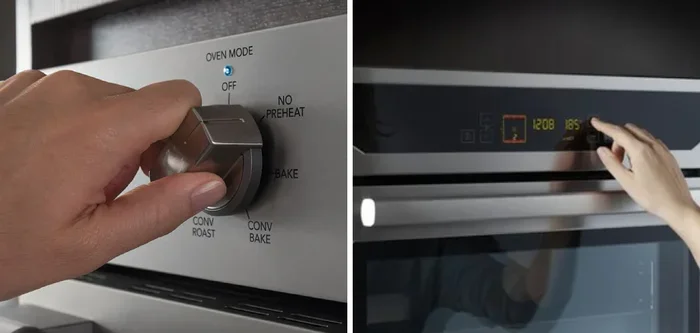
- Select Quick Bake mode: Look for the “Quick Bake” button on the control panel. On some models, you may need to press the “Bake” button and then scroll to find Quick Bake.
- Set your temperature: Use the temperature arrows to choose the right heat level. Keep in mind that Quick Bake runs hotter, so you may need to reduce the temperature slightly.
- Set the timer: Enter your desired cooking time using the timer controls. The oven will beep when the time is up.
- Place your food inside: Put your dish on the center oven rack and close the door firmly.
- Press Start: The oven will begin preheating and then start cooking once it reaches the target temperature.
Finding the Quick Bake Button on Different Models
Frigidaire offers a wide range of oven models. Some have digital touchscreens, while others use traditional dial controls. On touchscreen models, you may find Quick Bake listed under the “Bake” menu. On dial-based models, look for a dedicated “Quick Bake” setting on the mode selector. If you are unsure, check your owner’s manual. The manual will have a diagram showing exactly where each control is located.
Quick Tips: Always make sure your oven is clean before using Quick Bake. Grease and food residue on the heating elements can affect performance. A clean oven ensures your Quick Bake settings work exactly as designed.
Quick Bake vs Regular Bake: When to Use Each
Knowing when to use Quick Bake versus regular bake is one of the most important skills you can develop. Using the wrong mode can lead to overcooked edges, undercooked centers, or dried-out food. Let us break down the best use cases for each mode.
Best Foods for Quick Bake
The Quick Bake oven setting shines with foods that benefit from fast, even heating. Here are some excellent options:
- Cookies and biscuits: The circulating heat ensures every cookie bakes evenly. No more rotating your baking sheets halfway through.
- Casseroles and lasagna: These dishes need thorough heating throughout. Quick Bake delivers that without the long wait.
- Roasted vegetables: The fan helps create crispy edges on potatoes, carrots, and broccoli while keeping the inside tender.
- Pizza and reheated pizza: Quick Bake mimics a pizza oven effect, giving you a crispy crust in minutes.
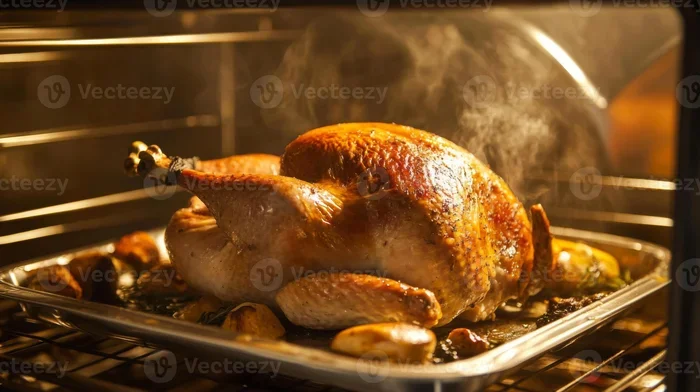
- Chicken and meat dishes: Faster cooking means juicy chicken with a nicely browned exterior.
Foods to Avoid Using Quick Bake With
Not every dish benefits from this mode. Some foods need gentle, steady heat. Here is what you should avoid:
- Soufflés and meringues: The strong fan can cause these delicate items to collapse or not rise properly.
- Flan and custards: Even heat distribution is important here, and Quick Bake can create uneven results.
- Bread dough: The rapid heat and airflow can form a crust too quickly, preventing proper rising.
- Delicate cakes: Some cakes need the gentle, consistent heat of regular bake to rise evenly.
Expert Insight: When in doubt, check your recipe. Most modern recipes will specify whether convection or Quick Bake is suitable. If the recipe simply says “bake,” regular bake is usually the safer choice.
Temperature and Time Adjustments for Quick Bake
One of the most common mistakes people make with Quick Bake is using the same temperature and time as regular bake. This almost always leads to overcooked food. Because Quick Bake is more efficient, you need to make small adjustments.
The 25-Degree Rule
A great rule of thumb is to reduce the temperature by about 25 degrees Fahrenheit compared to what your recipe calls for in regular bake mode. For example, if your recipe says to bake at 350 degrees for 30 minutes, try 325 degrees for 20 to 25 minutes in Quick Bake mode. This gives you the same great results in less time.
Here is a helpful reference table:
| Regular Bake Temp | Quick Bake Temp | Time Reduction |
|---|---|---|
| 350°F | 325°F | Reduce by 25-30% |
| 375°F | 350°F | Reduce by 25-30% |
| 400°F | 375°F | Reduce by 25-30% |
| 425°F | 400°F | Reduce by 25-30% |
These are starting points. Every oven is slightly different. The first time you try a new recipe in Quick Bake, keep a close eye on your food. You can always add a few more minutes if needed.
Using the Timer Effectively
The timer on your Frigidaire oven is your best friend when using Quick Bake. Because cooking times are shorter, food can go from perfectly done to overcooked very quickly. Set the timer for the minimum suggested time and check your food early. This habit will help you build intuition for how your specific oven performs in Quick Bake mode.
Quick Bake Tips and Tricks for Perfect Results
Getting the most out of your Frigidaire Quick Bake feature comes down to a few simple practices. These tips will help you achieve consistent, professional-quality results every time you use this mode.
Always Preheat Your Oven
Even though Quick Bake heats up faster, preheating is still essential. A cold oven means your food starts cooking unevenly. Give your oven about 3 to 5 minutes to reach the target temperature before placing your dish inside. Most Frigidaire ovens have a preheat indicator light that turns off when the temperature is reached.
Use the Center Rack Position
The center rack provides the most even exposure to the circulating hot air. Placing your dish too close to the top can cause the top to burn while the inside stays raw. Too close to the bottom can lead to over-browning on the bottom. The center position is the sweet spot for balanced quick baking results.
Do Not Overcrowd the Oven
Quick Bake relies on air circulation. If you pack too many dishes into the oven, the airflow gets blocked. This leads to uneven cooking and longer bake times. Leave at least two inches of space around each dish. If you need to bake multiple trays, consider using the convection roast setting or baking in batches.
Use Light-Colored Baking Pans
Dark pans absorb more heat and can cause the bottom of your food to burn quickly in Quick Bake mode. Light-colored aluminum pans reflect heat and promote more even baking. If you only have dark pans, try reducing the temperature by an additional 5 to 10 degrees.
Rotate Your Pan Halfway Through
Even with a convection fan, hot spots can exist in some oven models. Opening the door briefly to rotate your pan halfway through the cooking time helps ensure even browning. This simple step takes only a few seconds but can make a noticeable difference.
Common Quick Bake Mistakes and How to Fix Them
Even experienced cooks make mistakes when using Quick Bake on their Frigidaire oven. Knowing what goes wrong helps you avoid those pitfalls in the future.
Mistake 1: Using the Wrong Temperature
The most common error is not adjusting the temperature downward. Remember, Quick Bake is more powerful than regular bake. Using the full recipe temperature will almost always result in overcooked or burnt food. Always reduce by 25 degrees as a starting point.
Mistake 2: Opening the Door Too Often
While you should check on your food, opening the door too frequently lets out all the hot air. This disrupts the cooking process and increases the total time needed. Limit door openings to just once or twice during the bake cycle.
Mistake 3: Ignoring the Fan
Some Frigidaire models have a separate fan control. If the fan is not running, you are not truly using Quick Bake. You are just using regular bake at a higher temperature. Always confirm the fan is active before starting your cooking timer.
Mistake 4: Skipping the Preheating Step
It is tempting to just place food in a cold oven and set it to Quick Bake. This is a mistake. Preheating ensures the oven reaches the right temperature before your food starts cooking. Skipping this step leads to uneven results and longer cook times.
Troubleshooting Quick Bake Issues on Frigidaire Ovens
If your Quick Bake mode is not working correctly, do not worry. Most issues are easy to diagnose and fix. Here are some common problems and their solutions.
Quick Bake Does Not Turn On
First, check that your oven is properly plugged in and receiving power. If you have a digital panel, make sure it is not locked. Many Frigidaire ovens have a control lock feature that can be accidentally activated. Refer to your manual for instructions on how to unlock the controls.
Food Is Cooking Unevenly
This usually happens when the oven racks are not positioned correctly. Move your dish to the center rack and make sure nothing is blocking the airflow from the convection fan. Also, check that the fan blade is clean and free of debris. A buildup of grease on the fan can reduce its effectiveness.
Quick Bake Takes Too Long
If your cooking times are not reducing, the oven sensor may need cleaning. Food spills and grease on the sensor can cause it to read temperatures incorrectly. Gently clean the sensor with a soft cloth and mild detergent. If the problem persists, the sensor may need replacement.
Oven Is Too Hot or Burning Food
This could mean the temperature calibration is off. You can test your oven’s accuracy with an oven thermometer. Place the thermometer inside, set the oven to 350 degrees in Quick Bake mode, and compare the reading. If there is a significant difference, you may need to recalibrate your oven. Check your manual for calibration instructions specific to your model.
Maintaining Your Frigidaire Oven for Optimal Quick Bake Performance
Regular maintenance keeps your Frigidaire oven running at its best. A well-maintained oven heats faster, cooks more evenly, and lasts longer. Here are a few simple maintenance habits you should adopt.
- Clean after every use: Wipe up spills immediately after the oven cools. Baked-on grease can affect heating elements and fan performance.
- Deep clean monthly: Use an oven-safe cleaner to remove built-up residue from the walls and floor of the oven.
- Check the door seal: A worn-out door seal lets heat escape, reducing efficiency. Inspect it regularly and replace if needed.
- Clean the convection fan: Remove any food particles or grease buildup around the fan area. This keeps airflow strong and consistent.
- Schedule professional maintenance: Have your oven inspected annually by a qualified technician to catch any issues early.
Expert Insight: Keeping your oven clean is one of the simplest ways to ensure your Quick Bake feature continues to perform at a high level. A clean oven heats more efficiently and distributes heat more evenly, which directly impacts your cooking results.
Energy Savings With Quick Bake Mode
Using Quick Bake does more than save you time. It also saves energy. Because you cook faster, your oven uses less electricity or gas over the long run. A dish that takes 45 minutes in regular bake might only need 30 minutes in Quick Bake. That is a 33% reduction in energy use for that cooking session.
Over weeks and months, these savings add up. If you use Quick Bake regularly for weeknight dinners and baking projects, you will notice a difference in your energy bills. It is one of those rare features that saves both your time and your money.
Frequently Asked Questions About Quick Bake on Frigidaire Ovens
What temperature should I use for Quick Bake on my Frigidaire oven?
Reduce the temperature by about 25 degrees Fahrenheit compared to what your recipe calls for in regular bake mode. For example, if a recipe says 350 degrees, set your Quick Bake to 325 degrees. This prevents overcooking while still delivering great results in less time.
Can I use aluminum foil when using Quick Bake?
Yes, you can use aluminum foil in Quick Bake mode. However, avoid covering the entire oven rack or blocking the convection fan. Foil can reflect heat and help prevent over-browning on the top of your food. Just make sure the foil does not touch the heating elements directly.
Is Quick Bake the same as convection bake on my Frigidaire oven?
They are similar but not identical. Both use a fan to circulate hot air, but Quick Bake typically runs at a higher fan speed and slightly higher temperature. Convection bake is often more gentle and better suited for longer cooking sessions, while Quick Bake is designed for faster results.
Why does my food burn on the edges when using Quick Bake?
This usually happens when the temperature is too high or the dish is placed too close to the oven walls. Try reducing the temperature by an additional 5 to 10 degrees and make sure your pan is centered on the rack. Using light-colored pans also helps prevent edge burning.
How do I know if my Frigidaire oven has the Quick Bake feature?
Check your oven’s control panel for a “Quick Bake” button or setting. If your model has a touchscreen, look under the Bake menu. You can also consult your owner’s manual or visit the Frigidaire website and enter your model number to see the full list of features.
Can I use Quick Bake for baking bread?
It is not recommended. Bread needs steady, gentle heat to rise properly and develop a good crumb structure. The strong fan and rapid heat of Quick Bake can cause the crust to set too quickly, preventing the bread from rising fully. Stick with regular bake for bread baking.
Final Thoughts on Mastering Quick Bake on Your Frigidaire Oven
The Quick Bake feature on your Frigidaire oven is a game-changer for home cooking. It saves time, reduces energy use, and delivers consistently great results. Once you understand how to activate it, adjust temperatures, and choose the right foods, you will wonder how you ever baked without it.
Start with simple recipes like cookies, casseroles, and roasted vegetables. As you build confidence, you can experiment with more complex dishes. Remember the 25-degree rule, keep your oven clean, and always preheat before you begin. These small habits make a huge difference in the quality of your baked goods.
Quick Bake is not just a convenience feature. It is a tool that, when used correctly, elevates your cooking. Whether you are preparing a quick weeknight dinner or baking a batch of chocolate chip cookies for the family, this mode has you covered. Practice these techniques, trust your Frigidaire oven, and enjoy faster, better baking every single day.