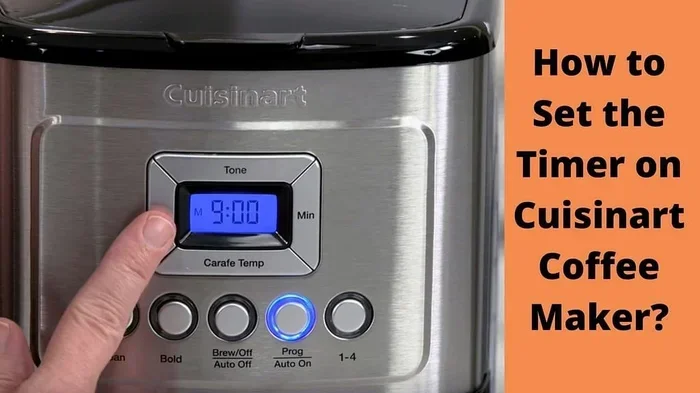
Learn How To Set Timer On Your Cuisinart Coffee Maker
Setting the timer on your Cuisinart coffee maker is simple and saves you time every morning. This guide walks you through each step clearly, from programming the 24-hour timer to adjusting brew strength. You will learn how to use the auto brew feature, fix common timer problems, and keep your machine running smoothly for years to come.
There is nothing quite like walking into the kitchen and smelling fresh coffee already brewing. The set timer Cuisinart coffee maker makes this possible every single morning. Whether you are a early bird or someone who needs a few extra minutes of sleep, programming your coffee maker timer changes your routine completely.
Cuisinart coffee makers are known for being reliable, easy to use, and packed with helpful features. The timer function is one of the best tools built into these machines. It lets you decide exactly when your coffee starts brewing. You set it once, and your Cuisinart handles the rest. No more rushing around before work. No more settling for weak, leftover coffee from yesterday.
In this guide, we will walk you through everything you need to know about using the timer on your Cuisinart coffee maker. We cover the basic steps, advanced settings, common problems, and simple maintenance tips. By the end, you will feel confident programming your machine like a pro. Let us get started.
Key Takeaways
- Easy Programming: Setting the timer on your Cuisinart coffee maker takes just a few minutes with clear steps.
- Auto Brew Feature: The programmable timer lets you wake up to fresh coffee without any effort.
- 24-Hour Flexibility: You can set a brew time up to 24 hours in advance for busy mornings.
- Troubleshooting Is Simple: Most timer issues can be fixed quickly with basic checks and resets.
- Maintenance Matters: Regular cleaning and descaling keep your timer and brew cycle working perfectly.
- Brew Strength Control: You can pair your timer settings with strength preferences for the perfect cup every time.
📑 Table of Contents
Understanding Your Cuisinart Coffee Maker Timer
Before you start pressing buttons, it helps to understand what the timer actually does. The timer on a Cuisinart coffee maker is a programmable clock. It works with the auto brew feature to turn your machine on at a specific time. When that time arrives, the machine starts brewing automatically.
Most Cuisinart models come with a digital display. This display shows the current time and your programmed brew time. Some models use buttons on the front panel. Others have a separate control pad. The basic idea is the same across all models. You set the current time first. Then you set the time you want the coffee to start brewing.
How the 24-Hour Timer Works
The 24-hour timer is the standard feature on most Cuisinart machines. This means you can set a brew time up to one full day ahead. For example, if it is 8 PM now, you can set the machine to start brewing at 7 AM the next morning. That gives you 11 hours of advance planning.
The timer stores your settings even when the machine is turned off. This is powered by a small internal battery. So you do not need to worry about resetting everything after a power outage. Just check the time display when the power comes back on.
Key Buttons You Will Use
Here are the main buttons you will interact with when programming your timer:
- Clock/Time Button: Used to set the current time on the display.
- Program/Auto Button: Activates the timer programming mode.
- Brew Button: Starts the brewing cycle manually or confirms your timer setting.
- Strength Control: Lets you choose regular or bold brew strength.
- Cancel Button: Clears your current programming if you make a mistake.
Not all Cuisinart models have every button listed above. Check your specific model’s manual for exact button names. But the general process is very similar across the Cuisinart lineup.
Step-by-Step Guide to Setting the Timer
Now that you understand the basics, let us walk through the actual process. Follow these steps carefully, and you will have your timer set in under five minutes.
Step 1: Make Sure the Machine Is Ready
Before you program anything, make sure your Cuisinart is plugged in and powered on. Check that the water reservoir is filled with clean, fresh water. Add your coffee grounds to the filter basket. A good rule of thumb is to use two tablespoons of grounds for every six ounces of water. This ensures your timed brew comes out tasting great.
Also make sure the carafe is seated properly on the warming plate. If the carafe is not in place, some models will not start the brew cycle, even with the timer set.
Step 2: Set the Current Time
Press the clock or time button. The display will start flashing, which means it is ready for you to enter the time. Use the hour and minute buttons to set the correct current time. Press the clock button again to confirm. The display will stop flashing.
This step is very important. If the current time is wrong, your timer will brew at the wrong time. Take a moment to double-check before moving on.
Step 3: Enter Programming Mode
Press the program or auto button. The display will show that the machine is now in programming mode. You will see the brew time section start to flash. This tells you the machine is ready to accept your desired brew time.
Use the hour and minute buttons to set the time you want your coffee to start brewing. For most people, setting the timer for 15 to 30 minutes before you wake up works perfectly. This gives the coffee enough time to brew and stay warm in the carafe.
Step 4: Confirm and Save Your Settings
Once you have entered your desired brew time, press the program or auto button again to confirm. The display will stop flashing. Your timer setting is now saved. The machine will remember this setting until you change it.
Some Cuisinart models also let you choose your brew strength at this point. If your machine has a strength control, now is a good time to set it to regular or bold depending on your preference.
Step 5: Test Your Timer
It is always a good idea to test your timer before relying on it for a busy morning. You can set the timer for a few minutes ahead and watch the machine start brewing when the time arrives. This confirms everything is working correctly. If the machine does not start, check the power connection and make sure the carafe is seated properly.
Programming the Auto Brew Feature
The auto brew feature is what makes the timer truly useful. Auto brew means your Cuisinart will start brewing coffee automatically at the time you set. You do not need to press any buttons in the morning. The machine does all the work while you sleep.
This feature is especially helpful on busy weekday mornings. You can prepare the night before, set the timer, and wake up to the smell of freshly brewed coffee. It is one of those small conveniences that makes a big difference in your daily routine.
How to Adjust Brew Strength with the Timer
Many Cuisinart models let you pair your timer with a brew strength setting. The strength control lets you choose between regular and bold coffee. When you set the timer, you can also set the strength at the same time. This means your machine will brew your coffee at the perfect strength automatically.
Bold coffee uses a longer extraction time and sometimes a different grind size. If you prefer stronger coffee, set the strength to bold when you program your timer. You will notice the difference in every cup.
Setting a Weekend or Holiday Schedule
You can also use the timer for weekend mornings or special occasions. Maybe you want coffee ready at 9 AM on Saturday instead of your usual 7 AM weekday time. Just reprogram the timer the night before. The process is the same no matter what day you are programming for.
Some people like to set their Cuisinart for Sunday morning brunch. The timer ensures fresh coffee is ready when your guests arrive. It takes the stress out of hosting and lets you enjoy the moment.
Common Timer Issues and How to Fix Them
Even the best coffee makers can have occasional timer problems. Most issues are easy to fix. Here are the most common problems and their solutions.
Timer Is Not Holding the Setting
If your timer keeps resetting or losing the programmed time, the internal battery may need replacement. Most Cuisinart machines use a small coin-cell battery to keep the timer running when the machine is unplugged. You can find replacement batteries at most hardware stores. Opening the back panel and swapping the battery usually fixes this problem quickly.
Another reason could be a power surge or outage. After a power interruption, the clock may reset to 12:00. Simply reset the time and reprogram your timer. This takes less than a minute.
Machine Does Not Start at the Programmed Time
If your Cuisinart does not start brewing at the set time, check a few things first. Make sure the machine is plugged in and the power switch is on. Verify that the carafe is properly seated on the warming plate. Check that the water reservoir has enough water. These simple checks solve most timer-related brewing failures.
Sometimes the programming button needs to be pressed again to reconfirm the settings. Try pressing the program button once more. If that does not work, unplug the machine for 30 seconds, then plug it back in and reprogram.
Display Is Not Working
If the display is blank or flickering, the machine may need a reset. Unplug it from the wall outlet and wait at least two minutes. Plug it back in and check if the display turns on. If it still does not work, the display panel may need professional repair. Contact Cuisinart customer support for assistance with warranty-covered issues.
Dealing with appliance problems can be frustrating, but the same troubleshooting mindset applies across your kitchen. For instance, if you have ever had to fix oven not heating problems, you know how important it is to check the basics first before assuming something is broken.
Tips for Getting the Best Results from Your Timer
Getting the most out of your Cuisinart timer is about more than just pressing buttons. A few simple habits make a big difference in the quality of your coffee.
Use Fresh Coffee Grounds
Always use fresh, quality coffee grounds for your timed brew. Pre-ground coffee loses flavor quickly. If you can, grind your beans just before setting the timer the night before. Fresh grounds give you a richer, more flavorful cup of coffee every morning.
Clean Your Machine Regularly
Regular cleaning keeps your Cuisinart running smoothly and your coffee tasting great. Just like you would clean your Cosori air fryer toaster oven regularly to maintain performance, your coffee maker needs the same care. Run a vinegar and water cycle once a month to remove mineral buildup. Wash the carafe and filter basket with warm, soapy water after each use.
Use Filtered Water
The water you use directly affects the taste of your coffee. Filtered water removes chlorine and other impurities that can affect flavor. Fill your water reservoir with cold filtered water every time. This small change improves the taste of every cup your machine brews.
Keep the Machine in a Cool, Dry Place
Heat and moisture can affect the timer electronics and the overall performance of your Cuisinart. Place your coffee maker on a flat, dry surface away from the stove or direct sunlight. This helps the internal components last longer and keeps the timer accurate.
Set a Reminder to Descale
Mineral deposits build up inside your coffee maker over time. This can slow down the brewing process and affect the timer accuracy. Descale your machine every one to three months depending on how often you use it. Cuisinart sells descaling solutions, or you can use a simple mixture of white vinegar and water.
Maintaining Your Cuisinart Coffee Maker for Long-Term Use
A good coffee maker is an investment. With proper care, your Cuisinart can last for many years. The timer function will continue to work reliably if you follow a few simple maintenance steps.
Replace the water filter regularly. Most Cuisinart models use a charcoal water filter that should be swapped out every 60 days. A clean filter ensures better-tasting water and better-tasting coffee. It also helps the internal components work efficiently.
Check the power cord and plug for any signs of wear or damage. A frayed cord can be a safety hazard. If you notice any damage, stop using the machine and contact Cuisinart for a replacement cord or service.
Store your machine properly if you are not using it for an extended period. Empty the water reservoir completely. Clean all removable parts thoroughly. Store the machine in a cool, dry place. When you are ready to use it again, run a full water cycle without coffee grounds to flush out any stale water.
Taking care of your coffee maker also means taking care of your morning routine. When your machine works well, you can rely on that perfect cup of coffee every single day. The timer is the key to making that happen without any extra effort.
Final Thoughts
The set timer Cuisinart coffee maker is one of the most useful features your machine offers. It brings convenience, consistency, and great taste to your morning routine. Once you learn how to program the timer, you will never want to go back to manual brewing.
Remember the steps we covered. Set the current time accurately. Enter programming mode carefully. Confirm your brew time. Test your settings before trusting them on a busy morning. And keep your machine clean and well-maintained for the best results.
Your Cuisinart coffee maker is designed to make your life easier. The timer feature is proof of that. Take a few minutes today to program your machine. Tomorrow morning, you will be rewarded with fresh, hot coffee waiting for you when you walk into the kitchen. That is a small effort for a big daily payoff.
Frequently Asked Questions
How long does it take to set the timer on a Cuisinart coffee maker?
Setting the timer takes about three to five minutes the first time you do it. Once you are familiar with the process, it takes less than two minutes. The key steps are setting the current time, entering programming mode, and entering your desired brew time. Practice makes it even faster.
Can I set the Cuisinart coffee maker timer for the same time every day?
Yes, you can set the timer for the same time every day. Once programmed, the Cuisinart remembers your settings until you change them. This is perfect for a consistent morning routine. You simply set it once and let the machine handle the rest each day.
What should I do if the timer setting is lost after a power outage?
If the timer resets after a power outage, you just need to reprogram it. First, set the current time again using the clock button. Then enter programming mode and set your desired brew time. The process takes only a couple of minutes. Consider plugging your machine into a surge protector to prevent future resets.
Can I use the timer feature with a half-batch brew?
Yes, the timer works with any brew size. You can program the timer and then choose to brew a full carafe or a smaller amount. Just make sure you add the right amount of water and coffee grounds before the timer activates the brew cycle. The machine will start brewing automatically at the set time.
Why does my Cuisinart coffee maker not brew when the timer goes off?
This usually happens because the carafe is not seated properly on the warming plate. Check that the carafe is clicked into place. Also verify that the water reservoir has enough water and the machine is powered on. If all of these are fine, try unplugging the machine for 30 seconds and plugging it back in, then reprogram the timer.
How often should I clean my Cuisinart coffee maker to keep the timer working well?
You should do a quick cleaning after each use and a deep clean with vinegar and water once a month. Regular cleaning prevents mineral buildup that can affect the machine’s performance, including the timer function. A well-maintained Cuisinart coffee maker will give you reliable timed brewing for years.