How Do I Reset My Jura Coffee Maker to Factory Settings
Resetting your Jura coffee maker to factory settings is easier than you think. Whether your machine is showing error codes, acting up, or you just want a fresh start, a factory reset can solve many common problems. This guide walks you through every step clearly and simply, so you can get back to brewing great coffee fast.
Your Jura coffee maker is a sleek, powerful machine that delivers café-quality drinks right at home. But like any complex appliance, it can sometimes act up. Maybe the display is frozen. Maybe it keeps showing an error code you don’t understand. Or maybe you just bought it secondhand and want to start fresh.
Whatever the reason, knowing how to reset your Jura coffee maker to factory settings is a valuable skill. factory reset processes are simpler than most people think. You don’t need to be a tech expert or call a repair person. In most cases, you can do it yourself in just a few minutes.
This guide covers everything you need to know. We’ll explain why you might need a reset, walk you through the exact steps, and share tips to keep your machine running great afterward. By the end, you’ll feel confident handling this yourself.
Key Takeaways
- Factory resets fix most Jura error codes and restore your machine to its original settings.
- The reset process takes only a few minutes and requires no special tools.
- Always save your custom settings before performing a reset, since everything will be erased.
- Regular maintenance after a reset keeps your Jura running smoothly for years.
- Knowing when to call a professional saves time and prevents further damage.
- Descaling and cleaning go hand in hand with resetting for optimal performance.
📑 Table of Contents
Why You Might Need to Reset Your Jura Coffee Maker
There are several reasons your Jura machine might need a reset. Understanding these helps you decide if a factory reset is the right move for your situation.
Common Signs Your Jura Needs a Reset
Watch for these telltale signs that your machine could benefit from a reset:
- The display screen is frozen or unresponsive to button presses.
- Error codes keep appearing even after you try to clear them.
- Your custom drink settings have changed or behave oddly.
- The machine makes unusual noises during brewing cycles.
- Water flow seems weak or inconsistent despite a clean system.
- You’ve installed a new water filter and the machine won’t recognize it.
If you notice any of these issues, a reset is often the first troubleshooting step. It clears temporary glitches and restores your machine’s default operating parameters. Think of it like restarting your phone when it gets glitchy.
Understanding Your Jura’s Display and Controls
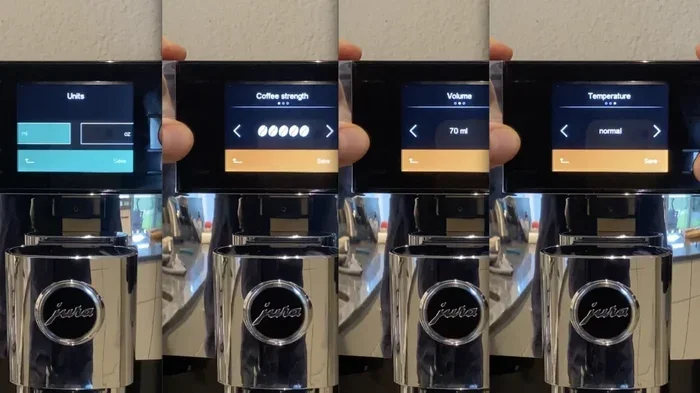
Jura machines come with intuitive touchscreen displays or button panels depending on the model. The display shows your current settings, error messages, and maintenance reminders. When something goes wrong, the machine communicates through these alerts.
Different Jura models display information differently. The Jura E8, Jura S8, and Jura Giga series all have slightly different interfaces. However, the reset process is generally similar across most models. Always check your user manual for model-specific details before starting.
How to Reset Your Jura Coffee Maker to Factory Settings
Now let’s get into the actual reset process. Follow these steps carefully for the best results.
Step-by-Step Reset Process
Here’s how to perform a factory reset on most Jura coffee machines:
- Turn off your Jura machine and unplug it from the wall outlet. Wait at least 30 seconds. This allows the internal electronics to fully power down.
- Press and hold the program button and the steam button simultaneously. On some models, you may need to press the roast level button and the program button instead.
- While holding those buttons, plug the machine back in. Keep holding the buttons for about 10 seconds until you see the display light up or a logo appear.
- Release the buttons once the screen shows the reset or setup menu.
- Follow the on-screen prompts to complete the factory reset. This usually involves selecting your language and confirming the reset.
- Let the machine complete its initialization cycle. This may take 2-3 minutes. Do not use the machine during this time.
Once the process is complete, your Jura will be restored to its original factory settings. All custom drink profiles, saved preferences, and error codes will be cleared.
What Happens After a Factory Reset
After resetting, your Jura essentially becomes a brand-new machine in terms of settings. Here’s what to expect:
- All custom drink recipes are erased. You’ll need to recreate your favorite coffee profiles from scratch.
- Language and clock settings return to defaults. You’ll need to set these again.
- Error codes are cleared. If the reset fixed the issue, those messages should not return.
- The machine runs a self-check during startup to ensure all components are working properly.
Pro tip: Before you reset, write down your current settings or take photos of your custom drink profiles. This makes it much easier to restore them afterward. Some users also note that if you’re experiencing persistent issues, you might want to check if your machine needs descaling — a thorough cleaning process that removes mineral buildup inside the machine.
Descaling is different from a factory reset but often works hand in hand with it. If you’ve never descaled your Jura, a reset followed by a full descale cycle can work wonders. For a detailed guide on descaling, you can check out our article on how to decalcify a Keurig coffee maker, which covers similar principles that apply to Jura machines as well.
Troubleshooting Common Jura Issues After a Reset
A factory reset solves many problems, but not all of them. Here’s how to handle situations where issues persist after the reset.
When the Reset Doesn’t Work
If your Jura still shows the same error codes or behaves the same way after a reset, don’t panic. Try these steps:
- Perform a second reset. Sometimes a single reset isn’t enough to clear deep system errors.
- Check the water supply. Make sure the water tank is full and properly seated. Low water levels trigger many error codes.
- Clean the drip tray and coffee grounds container. Full containers can cause the machine to stop working or show warnings.
- Inspect the water filter. A clogged or expired filter can cause flow problems that mimic software errors.
- Try a hard reset by holding the power button for 15 seconds. This forces a complete shutdown of the electronic systems.
If none of these steps work, the issue may be hardware-related. In that case, it’s best to contact Jura customer support or a certified service technician.
Dealing with Error Codes
Jura machines use specific error codes to communicate problems. Here are the most common ones you might see:
- Error E1: Water supply issue. Check that the water hose is connected and the tank has water.
- Error E2: Coffee bean hopper is empty or blocked. Refill or clean the bean container.
- Error E3: The brewing unit needs cleaning. Run a cleaning cycle or descale the machine.
- Error E4: The machine is too hot and needs to cool down. Wait 15-20 minutes before using it again.
- Error E5: A component is stuck or misaligned. Try removing and reinserting the brewing unit.
After a factory reset, most temporary error codes disappear. If they keep coming back, the underlying cause needs physical attention, not just a software reset.
Maintaining Your Jura Coffee Maker After a Reset
A reset gives your machine a fresh start. But keeping it running well requires regular care. Here’s how to maintain your Jura after a factory reset.
Regular Cleaning and Descaling
Your Jura machine has a built-in cleaning reminder system. When the display prompts you to clean or descale, don’t ignore it. Here’s a simple maintenance routine:
- Rinse the water tank with clean water every week.
- Clean the drip tray and grounds container after every few uses.
- Run the automatic cleaning cycle monthly using Jura cleaning tablets.
- Descale the machine every 3-6 months depending on your water hardness.
- Wipe the exterior with a damp cloth to keep it looking new.
Regular maintenance prevents most issues that would otherwise require a factory reset. It also extends the life of your machine significantly.
Keeping Your Jura Running Smoothly
Beyond cleaning, a few simple habits keep your Jura in top shape:
- Use quality coffee beans. Oily or low-quality beans can clog the grinder and brewing unit.
- Don’t overfill the bean hopper. Keep it about two-thirds full for optimal grinding performance.
- Use filtered water. This reduces mineral buildup and extends the time between descaling sessions.
- Run a blank water cycle once a week to flush out any residual coffee oils.
- Replace the water filter every 2-3 months or as recommended by Jura.
These habits are simple but powerful. They mean fewer surprises and better-tasting coffee every morning.
The Role of the Grinder in Your Jura Machine
Jura machines feature built-in ceramic grinders that are a big part of what makes them so convenient. The grinder settings affect the taste and strength of your coffee. If your coffee tastes off after a reset, you may need to adjust the grinder settings.
Some users wonder whether they can use their Jura grinder for other purposes, like grinding spices or wet ingredients. While Jura grinders are designed specifically for coffee beans, some people explore using a separate coffee grinder for wet grinding tasks. If you’re curious about this, it’s worth understanding the differences between your machine’s built-in grinder and standalone grinder options.
Expert Tips for Jura Owners
Here are some insider tips from experienced Jura users and technicians:
- Don’t reset too often. Frequent resets can wear out the machine’s electronics. Only reset when necessary.
- Keep your user manual handy. It has model-specific instructions that generic guides can’t replace.
- Update your machine’s firmware if your model supports it. New updates often fix bugs that trigger error codes.
- Use original Jura parts for replacements. Third-party parts can cause compatibility issues that lead to more errors.
- Record your settings. Take a photo or write down your preferred brew strength, temperature, and coffee volume before any reset.
These small steps make a big difference over time. They help you avoid unnecessary resets and keep your coffee experience enjoyable every single day.
When to Call a Professional
Most reset and troubleshooting steps are safe to do at home. But some situations call for professional help. Contact Jura support or a certified technician if:
- The machine still shows error codes after two factory resets.
- You notice water leaking from the machine or around the base.
- The grinder makes grinding noises but doesn’t produce coffee grounds.
- The display remains completely blank even after a full power cycle.
- Your warranty is still active and you want to avoid voiding it with DIY repairs.
Professional technicians have access to diagnostic tools and replacement parts that aren’t available to regular users. They can quickly identify and fix hardware issues that a simple reset can’t address.
Remember, a factory reset is a software-level fix. It won’t repair a broken pump, a damaged brewing unit, or a faulty sensor. Understanding this distinction saves you time and frustration.
Final Thoughts
Resetting your Jura coffee maker to factory settings is a straightforward process that can solve a surprising number of problems. Whether your display is frozen, error codes keep appearing, or you just want a clean slate, the steps in this guide will help you get it done quickly and safely.
The key is to approach the reset calmly and follow each step carefully. Don’t rush through the process, and make sure you’ve saved any custom settings you want to keep. After the reset, establish a regular maintenance routine to prevent issues from coming back.
Your Jura machine is an investment in better coffee at home. Taking care of it with proper resets, cleaning, and maintenance ensures it keeps delivering delicious drinks for years to come. If you ever want to explore more about coffee preparation, you might enjoy learning how to make your own Dunkin iced coffee at home with your freshly reset machine.
Now you have everything you need to handle a reset with confidence. Go ahead, give your Jura a fresh start, and enjoy that perfect cup of coffee.
Frequently Asked Questions
How long does it take to reset a Jura coffee maker to factory settings?
The actual reset process takes about 5 to 10 minutes. However, the full initialization cycle after the reset can take an additional 2 to 3 minutes. Plan for about 15 minutes total from start to finish.
Will a factory reset delete my saved drink recipes?
Yes, a factory reset erases all custom drink profiles and saved settings. This is why it’s important to write down or photograph your preferred settings before starting the reset process.
How often should I reset my Jura coffee maker?
You should only reset your Jura when you’re experiencing persistent issues that other troubleshooting steps can’t fix. Regular resets are not necessary and should be avoided unless needed.
Can I reset my Jura without unplugging it?
It’s strongly recommended to unplug the machine before performing a reset. This ensures a complete power cycle and helps the electronics fully reset. Skipping this step can lead to incomplete resets.
What’s the difference between a reset and a descale on a Jura machine?
A reset restores the machine’s software settings to factory defaults. Descaling is a physical cleaning process that removes mineral deposits from the internal water system. Both are important but serve different purposes.
My Jura reset button isn’t working. What should I do?
Try holding the power button for 15 seconds to force a complete shutdown, then restart normally. If the buttons still don’t respond, the machine may need professional inspection for a hardware issue.
=== INTERNAL LINKS ===
For more coffee maker care tips, check out these helpful resources:
- How Do You Decalcify A Keurig Coffee Maker – Learn about descaling and mineral buildup removal
- Can Coffee Grinder Be Used For Wet Grinding – Understand grinder capabilities and limitations
- How To Make Your Own Dunkin Iced Coffee – Create café-style drinks at home with your Jura