How To Change Chefman Air Fryer To Fahrenheit Fast
Changing your Chefman air fryer to Fahrenheit is quick and easy once you know the right steps. This guide walks you through the process so you can start cooking with your preferred temperature unit right away. Whether you own a Chefman digital or manual model, you will find clear instructions here.
If you just bought a Chefman air fryer and the temperature display shows Celsius, you are not alone. Many people prefer cooking in Fahrenheit, especially in the United States. The good news is that changing the Chefman air fryer to Fahrenheit is a simple process that takes less than five minutes.
In this guide, we will walk you through every step. You will learn how to adjust the temperature settings, understand your control panel, and avoid common mistakes. By the end, you will feel confident switching your air fryer units whenever you need to. Let us get started.
Key Takeaways
- Easy Process: Switching your Chefman air fryer to Fahrenheit takes just a few simple steps.
- No Tools Needed: You do not need any special equipment or technical skills.
- Multiple Models: The method works for most Chefman air fryer models with digital displays.
- Better Cooking: Using Fahrenheit helps you follow recipes more accurately.
- Quick Reset: You can switch back to Celsius anytime you want.
- Temperature Accuracy: Correct settings ensure your food cooks at the right heat every time.
📑 Table of Contents
- Why You Should Change Your Chefman Air Fryer to Fahrenheit
- How To Change Chefman Air Fryer to Fahrenheit
- Chefman Air Fryer Models and Their Features
- How To Convert Celsius to Fahrenheit Manually
- Common Mistakes When Changing Temperature Units
- Tips for Perfect Cooking With Your Air Fryer in Fahrenheit
- When To Contact Chefman Customer Support
- Conclusion
Why You Should Change Your Chefman Air Fryer to Fahrenheit
Most air fryers come set to Celsius by default. This works great for people in countries that use the metric system. But if you live in the US or follow American recipes, Fahrenheit makes more sense. Here is why switching matters.
American recipes use Fahrenheit. When you look up a recipe online, the temperature is almost always in Fahrenheit. If your air fryer shows Celsius, you have to convert every time. This can lead to cooking errors and uneven results.
Familiarity matters. Most Americans grew up using Fahrenheit for oven and cooking temperatures. Using the same unit on your air fryer keeps things consistent. You will feel more comfortable and cook with more confidence.
Precision is easier. Fahrenheit degrees are smaller increments than Celsius. This means you can fine-tune your air fryer temperature more precisely. For delicate dishes like air fryer recipes for chicken or vegetables, this small difference can make a big impact.
Understanding Temperature Units
Before you change settings, it helps to understand the difference. Celsius sets water boiling at 100 degrees and freezing at 0 degrees. Fahrenheit sets water boiling at 212 degrees and freezing at 32 degrees. So a recipe that says 350°F equals about 175°C. When you switch to Fahrenheit, you will see numbers that match your cookbooks and online guides directly.
How To Change Chefman Air Fryer to Fahrenheit
Now let us get into the actual steps. The process varies slightly depending on your Chefman model, but the general method works for most units. Follow along carefully.
Step 1: Plug In Your Air Fryer and Turn It On
Start by plugging your Chefman air fryer into a power outlet. Press the power button to turn it on. You should see the display light up. Some models show a welcome screen or the last used setting. Wait for the home screen to appear before moving to the next step.
Make sure your air fryer is on a flat, stable surface. Give it a few inches of space on all sides for proper airflow. This is important for safe operation and accurate temperature control.
Step 2: Locate the Settings or Menu Button
Look for a button labeled “Settings,” “Menu,” or a gear icon on your control panel. This is where you access the unit preferences. On some Chefman models, you may need to press and hold a specific button for a few seconds to enter the settings menu.
If you cannot find the settings button, check your manual. The Chefman manual has a diagram that shows every button and its function. Most models have a dedicated settings button on the front panel near the display.
Step 3: Navigate to Temperature Unit Settings
Once you are in the settings menu, use the arrow buttons to scroll through the options. Look for “Temperature Unit,” “Temp Unit,” or “°C/°F.” This option controls whether your display shows Celsius or Fahrenheit.
When you find it, press the select or OK button to highlight it. You should see the current unit displayed on screen. Most Chefman models will show “°C” if the unit is currently set to Celsius.
Step 4: Switch to Fahrenheit
Press the same button again or use the arrow keys to toggle between °C and °F. When you see “°F” appear on the display, press OK or Select to confirm your choice. The screen should refresh and now show temperatures in Fahrenheit.
Some models may beep or flash to confirm the change. If nothing happens, try pressing the power button once and check the display again. Your air fryer settings should now be saved in Fahrenheit.
Step 5: Test the New Setting
To make sure everything works, try setting a temperature. Press the temperature up or down buttons and watch the display. The numbers should now show in Fahrenheit degrees. Try setting it to 350°F and see if it matches what you expect.
If the display still shows Celsius, unplug the air fryer for 30 seconds and plug it back in. This resets the unit and often fixes minor display glitches. If the problem continues, consult your Chefman manual for model-specific troubleshooting steps.
Chefman Air Fryer Models and Their Features
Chefman makes several air fryer models, and each one has slightly different controls. Here is a quick look at what you might encounter.
Digital Display Models
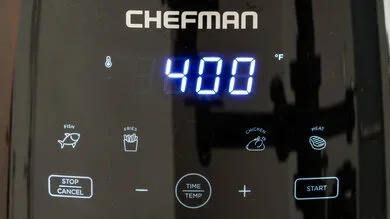
Most modern Chefman air fryers come with a digital touchscreen or button panel. These models make it easy to switch between Celsius and Fahrenheit. The digital display shows the temperature clearly, so you can read it from across the room while cooking.
These models often include preset buttons for common foods like fries, chicken, and vegetables. The digital display also shows the remaining cook time, making it simple to monitor your meals. Changing the temperature unit on these models usually takes just a few button presses.
Manual Dial Models
Some Chefman air fryers use a manual dial for temperature control. These models may not have a digital settings menu. On these units, the temperature scale is printed right on the dial itself. You may need to physically look at the dial markings to see whether it shows Fahrenheit or Celsius.
If your model has a fixed dial, you might not be able to switch units. In that case, you will need to manually convert temperatures using a simple formula. We will cover that in the next section.
How To Convert Celsius to Fahrenheit Manually
Not all Chefman air fryers let you change the display unit. Some models have a fixed temperature scale. But do not worry. You can still cook using Fahrenheit with a simple conversion method.
The Conversion Formula
The formula to convert Celsius to Fahrenheit is: multiply the Celsius temperature by 1.8, then add 32. For example, if a recipe calls for 180°C, you would multiply 180 by 1.8 to get 324, then add 32 to get 356°F. Round to the nearest 5 or 10 degrees for easy setting on your air fryer.
Quick reference: 350°F equals 175°C, 375°F equals 190°C, and 400°F equals 200°C. These are the most common cooking temperatures for air fryer recipes, so memorizing them saves a lot of time.
Using a Conversion Chart
If math is not your strong suit, keep a conversion chart handy. You can print one out and tape it inside your kitchen cabinet. Many websites offer free printable charts that show common oven and air fryer temperatures in both units. This way, you always have a quick reference while cooking.
Some Chefman models also come with a quick-reference card in the box. Check your packaging or the Chefman manual to see if one was included. These cards list the most popular temperatures in both Fahrenheit and Celsius.
Common Mistakes When Changing Temperature Units
Switching your air fryer units seems simple, but people make mistakes. Here are the most common ones and how to avoid them.
Forgetting to Save the Setting
On some models, you must confirm your selection before it saves. If you toggle to Fahrenheit but do not press OK or Select, the unit may revert to Celsius after you unplug it. Always wait for the confirmation beep or screen flash before moving on.
Confusing the Temperature Scale
After switching units, it is easy to forget which scale you are using. Always double-check the display before setting a temperature. Cooking at 350°C instead of 350°F would be a disaster. The air fryer temperature would be way too high and could burn your food or damage the unit.
Not Resetting After a Power Outage
If your kitchen loses power, your air fryer may reset to its default settings. This often means it goes back to Celsius. After the power comes back, check your temperature unit and adjust if needed. This is a quick habit that prevents cooking mistakes.
Ignoring the Manual
Every Chefman model has its own quirks. The Chefman manual contains model-specific instructions that can save you time and frustration. If you lost your manual, you can usually find a digital copy on the Chefman website by searching for your model number.
Tips for Perfect Cooking With Your Air Fryer in Fahrenheit
Now that your Chefman air fryer is set to Fahrenheit, here are some tips to get the best results.
Preheat Your Air Fryer
Just like a regular oven, preheating your air fryer helps food cook more evenly. Set the temperature to your desired heat and let it run for 3 to 5 minutes before adding your food. This is especially important for air fryer recipes that require a crispy exterior.
Do Not Overcrowd the Basket
Overcrowding blocks airflow and leads to uneven cooking. Leave space between each piece of food so hot air can circulate properly. For best results, cook in batches if you are preparing a large amount. This applies whether you are making air fryer recipes for fries, chicken, or vegetables.
Shake or Flip Halfway Through
For even browning, shake the basket or flip your food halfway through the cook time. This simple step makes a big difference. It ensures all sides get equal exposure to the hot air circulating inside the fryer.
Use a Meat Thermometer for Proteins
When cooking chicken, beef, or pork in your air fryer, use a meat thermometer to check the internal temperature. This ensures your food is safe to eat and cooked to your preference. The cooking temperature for chicken breast, for example, should reach 165°F internally.
If you are comparing cooking methods, keep in mind that does air fryer take less time than oven in most cases, yes. Air fryers cook faster because of their compact size and powerful fan. This means you may need to reduce cook times when converting oven recipes to your air fryer.
When To Contact Chefman Customer Support
If you have tried all the steps above and your Chefman air fryer still will not switch to Fahrenheit, it may be time to contact support. Before reaching out, make sure you have your model number ready. You can find this on the bottom of the unit or on the original box.
Chefman offers customer support through their website and phone line. They can walk you through model-specific steps and help with any technical issues. Most temperature display problems are simple fixes that customer support can resolve quickly.
You can also check online forums and communities where other Chefman owners share tips. Sometimes another user has already found a solution for your exact model. These communities can be a great resource for troubleshooting and recipe ideas.
Conclusion
Changing your Chefman air fryer to Fahrenheit is a simple process that improves your cooking experience. Whether you use the digital settings menu or a manual conversion method, you now have all the tools you need. Your air fryer will display temperatures in a way that matches your cookbooks and recipes perfectly.
Remember to always double-check your settings before cooking. Save your changes, and do not be afraid to experiment with different temperatures. The more you use your air fryer in Fahrenheit, the more natural it will feel. Soon you will be whipping up crispy fries, juicy chicken, and perfectly roasted vegetables with ease.
Take a few minutes today to make this simple change. It is one of those small adjustments that makes a big difference in your daily cooking routine. Happy frying.
Frequently Asked Questions
Can I change my Chefman air fryer from Celsius to Fahrenheit?
Yes, most Chefman air fryer models allow you to switch between Celsius and Fahrenheit through the settings menu. Simply navigate to the temperature unit option and select Fahrenheit to update your display.
What if my Chefman air fryer does not have a settings menu?
Some manual dial models do not offer a digital settings menu. In this case, you can use the Celsius-to-Fahrenheit conversion formula or keep a conversion chart nearby while cooking to translate temperatures manually.
Will changing the temperature unit affect my cook times?
No, changing the display unit does not affect cook times. It only changes how the temperature is shown. The actual heat produced by the air fryer remains the same regardless of the unit displayed.
How do I know if my Chefman air fryer is set to Fahrenheit?
Check the temperature display on your air fryer. If it shows the degree symbol followed by “F,” it is set to Fahrenheit. If it shows “C,” it is still in Celsius mode.
Can I switch back to Celsius after changing to Fahrenheit?
Absolutely. You can switch back to Celsius anytime by going into the settings menu and selecting the Celsius option. The process is the same as switching to Fahrenheit, just in reverse.
Do all Chefman air fryer models support Fahrenheit?
Most modern Chefman air fryer models support both Fahrenheit and Celsius. However, some older or basic models may have a fixed temperature scale. Check your Chefman manual or the control panel to confirm your model’s capabilities.