How To Turn Off Beeping On Air Fryer Without Hassle
A beeping air fryer can drive you crazy, but silencing it is easier than you think. This guide shows you exactly how to turn off beeping on air fryer models from brands like Cosori, Ninja, and Philips in just a few steps. You’ll learn simple button combinations, setting adjustments, and troubleshooting tips to stop the noise for good.
That constant beeping from your air fryer can turn a quick meal into a headache. Whether it’s the done alarm or an error signal, the noise can drive anyone up the wall. If you’ve been searching for a way to turn off beeping on air fryer units, you’re in the right place. This guide walks you through every method, from simple button presses to deeper troubleshooting, so you can enjoy quiet cooking again.
Air fryers are designed to be convenient, but their alert systems can feel overly sensitive. A beeping air fryer might warn you about an open door, overheating, or simply that your food is ready. Understanding why it beeps is the first step to silencing it. In the sections below, I’ll show you exactly how to turn off beeping on air fryer models from top brands like Cosori, Ninja, Philips, and Instant Vortex. You’ll also learn how to prevent false alarms and when the beeping actually indicates a real problem.
By the end of this article, you’ll have the confidence to handle any air fryer alert. No more jumping every time the kitchen fills with a sharp beep. Let’s dive into the fixes.
Key Takeaways
- Know your model: Each air fryer has a unique method to silence beeping, often found in the manual or settings menu.
- Use the right button combo: Holding down the power or cancel button for a few seconds is the most common fix.
- Adjust sound settings: Many modern air fryers let you turn off all alerts or reduce volume through the control panel.
- Check for errors: Persistent beeping might signal an unlatched door, overheating, or a stuck button that needs attention.
- Reset as a last resort: A factory reset can clear stubborn alert settings that won’t go away otherwise.
- Prevent future beeping: Regular cleaning and proper placement can stop false alarms from triggering.
📑 Table of Contents
- Why Does My Air Fryer Beep So Much?
- How To Turn Off Beeping On Air Fryer: Step-by-Step Methods
- Model-Specific Silence Methods
- Comparison Table: How Different Brands Handle Air Fryer Beeping
- Common Mistakes That Cause Constant Beeping
- Quick Tips to Keep Your Air Fryer Quiet
- When to Seek Professional Help
- Expert Insights: Why Silence Matters
- Conclusion
Why Does My Air Fryer Beep So Much?
Before you learn how to turn off beeping on air fryer, it helps to understand what triggers the sound. Air fryers use beeps to communicate different states. Most units have at least three types of alerts.
Done Cooking Beep
This is the most common beep. It sounds when your food reaches the set time and temperature. The air fryer timer beep lets you know your meal is ready. Some models beep three times; others beep continuously until you open the basket or press a button.
Error or Warning Beep
A rapid or repeated beep usually signals an error. Common causes include an unlatched door, a blocked air vent, or an internal temperature fault. The air fryer error beep is designed to grab your attention immediately. If you hear this, check the display panel for an error code.
Preheat Complete Beep
Many modern air fryers beep when they reach the preheat temperature. This is a helpful feature, but it can be annoying if you’re not ready to cook yet. The air fryer preheat alert is often separate from the done alarm.
Knowing which beep you’re dealing with makes it much easier to find the right solution. If you’re curious about how air fryer timing compares to a regular oven, check out does an air fryer take less time than an oven for a detailed comparison.
How To Turn Off Beeping On Air Fryer: Step-by-Step Methods
Now for the core of the guide: how to turn off beeping on air fryer units. The exact steps vary by brand and model, but the general approaches fall into a few categories. I’ll cover the most common methods that work across many popular devices.
Method 1: The Power Button Hold
This is the simplest fix for many air fryer models. With the fryer on and the basket in place, press and hold the power button for 5 to 10 seconds. The display may flash or the beeping will stop immediately. Release the button once the screen goes blank or the alert stops.
On some units, you need to hold the cancel button instead. Look for a small speaker icon or a mute symbol on the control panel. If you see it, tap and hold that button for a few seconds. This often toggles all sounds off.
Method 2: Navigate the Settings Menu
Most digital air fryers have a settings or gear icon. Press it to enter the menu. Scroll through the options using the plus and minus buttons or arrow keys. You’re looking for a sound settings, volume control, or alert settings submenu.
- Select Sound or Volume.
- Use the dial to reduce the volume to zero or turn it off entirely.
- Confirm your choice by pressing OK or Start.
Many Ninja Foodi and Philips Airfryer models let you customize individual alerts. You can mute the done beep but keep the preheat alert, or vice versa. This level of control is a great feature once you find it.
Method 3: The Reset Trick
If the beeping persists and you can’t find the sound menu, a factory reset often works. Unplug the air fryer and let it sit for 2 to 3 minutes. Plug it back in and turn it on. The unit will usually revert to default settings, including sound levels.
For Cosori models, you can also reset by holding the power and cancel buttons simultaneously for 10 seconds while the unit is off. This clears any custom alert settings that might be causing the noise.
Remember that how to turn off beeping on air fryer methods can differ, so always keep your manual handy. If you’ve lost it, a quick web search for your model number usually brings up the exact steps.
Model-Specific Silence Methods
Different brands have unique ways to handle the air fryer beeping. Here’s how to silence some of the most popular models. I’ll also point you to related guides for other kitchen tasks.
Cosori Air Fryer
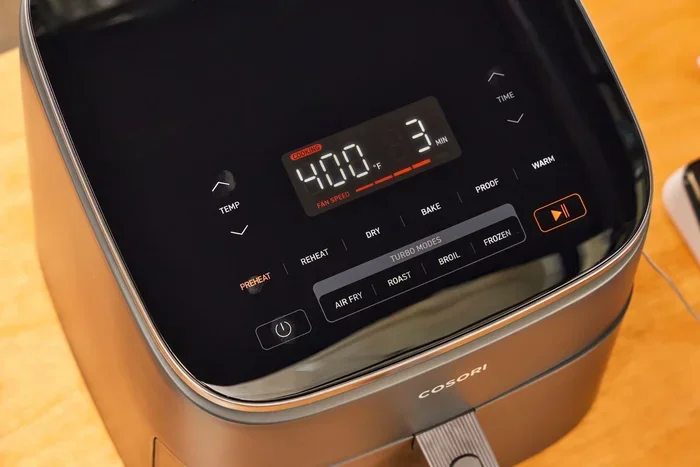
Cosori units are known for their user-friendly panels. To mute a Cosori air fryer, press and hold the Cancel button for 3 seconds while the fryer is on. The display will show a mute icon or the volume bar will drop to zero. If that doesn’t work, hold the Power and Menu buttons together for 5 seconds. This resets the sound settings.
Keeping your Cosori clean helps prevent false alarms. Learn how to clean a Cosori air fryer toaster oven to maintain optimal performance and avoid sensor errors that trigger unnecessary beeping.
Ninja Foodi Air Fryer
Ninja models often have a dedicated Sound button. Look for a speaker icon on the control panel. Tap it once to cycle through mute, low, medium, and high volume. If your model lacks this button, press and hold the Start/Pause button for 8 seconds to access the sound menu.
Ninja Foodi units also beep when the crisper lid is not fully closed. Make sure the lid locks into place with a firm click. A loose lid will trigger a continuous warning beep even after you turn off the alerts.
Philips Airfryer
Philips air fryers use a touch-sensitive control bar. To turn off beeping on air fryer from Philips, press and hold the Temperature and Time buttons simultaneously for 5 seconds. The display will show a volume icon. Use the temperature buttons to adjust to zero. Confirm by pressing the On/Off button.
Philips models also beep when the drawer is not properly seated. Push the drawer in until it clicks. A poorly inserted drawer is one of the most common causes of persistent beeping on these units.
Instant Vortex and Other Brands
Instant Vortex air fryers typically have a Sound option in the settings menu. Press the Menu button, scroll to Sound, and toggle it off. For other brands like GoWISE USA or Ultrean, the power button hold method usually works. If you’re unsure, try holding the cancel button for 10 seconds as a universal fix.
When you’re cooking multiple dishes, you might want to adjust the air fryer time to match oven recipes. Check out how to adjust oven time to air fryer for easy conversion tips that help you avoid overcooking and the beeps that come with it.
Comparison Table: How Different Brands Handle Air Fryer Beeping
| Brand | Common Mute Method | Where to Find Setting | Notes |
|---|---|---|---|
| Cosori | Hold Cancel for 3 sec or Power+Menu for 5 sec | Control panel or reset | Cleaning the sensor prevents false beeps |
| Ninja Foodi | Tap Sound button or hold Start/Pause for 8 sec | Dedicated button or settings menu | Check lid lock for continuous beeping |
| Philips Airfryer | Hold Temperature+Time for 5 sec, set to zero | Touch control bar | Drawer must click into place |
| Instant Vortex | Menu → Sound → Toggle Off | Settings menu | Universal power button hold also works |
| GoWISE USA | Hold Cancel for 10 sec | No dedicated mute button | Reset if beeping persists |
Common Mistakes That Cause Constant Beeping
Sometimes the air fryer isn’t malfunctioning. You might be doing something that triggers the alarm repeatedly. Fixing these habits can stop the beeping for good.
Overcrowding the Basket
Filling the basket past the max line blocks airflow. The fryer detects this and beeps to warn you. Give your food room to circulate hot air. For crispy results without the noise, use a single layer and shake the basket halfway through cooking.
Missing the Basket Click
Many air fryers won’t start—or will beep—unless the basket is fully seated. Push it in until you hear a distinct click. If the basket is slightly askew, the sensor thinks the door is open and sounds an alert. This is a safety feature, not a bug.
Dirty Sensors
The temperature and humidity sensors can get coated with grease or food residue. A dirty sensor sends incorrect readings, causing the unit to beep as if something is wrong. Wipe the interior with a damp cloth after every few uses. For a deep clean, follow a thorough routine that covers all parts.
For more on keeping your kitchen equipment in top shape, see how to cook a baked potato in an air fryer oven without triggering false alarms by using the right temperature and basket placement.
Quick Tips to Keep Your Air Fryer Quiet
Prevention is better than cure. A few simple habits can reduce the number of times your air fryer beeps unnecessarily.
- Place the fryer on a flat, stable surface. Vibrations can trick the internal sensors into thinking the unit is moving or unstable.
- Don’t open the basket too often. Each time you open it, heat escapes and the fryer may beep to signal the temperature drop.
- Use the correct basket size. Putting a small basket into a large fryer, or vice versa, can cause alignment issues and false alerts.
- Clean the drip tray regularly. A full drip tray can cause steam to leak and trigger a warning beep.
- Update firmware if available. Some smart air fryers have app updates that fix sensor bugs causing phantom beeps.
These quick tips take only a few minutes and can save you from hours of annoying noise. If you’ve ever wondered whether air fryer cooking times differ from oven times, you can find a detailed breakdown in our guide on does an air fryer take less time than an oven.
When to Seek Professional Help
Most beeping issues are fixable at home. But if you’ve tried every method and the air fryer alarm still won’t stop, there might be a deeper hardware problem.
Watch for these signs:
- The unit beeps continuously even when empty and powered off.
- The display shows an error code that doesn’t clear after a reset.
- The beeping is accompanied by a burning smell or smoke.
- The fryer trips the circuit breaker or won’t turn on at all.
In these cases, stop using the appliance immediately. Contact the manufacturer’s customer service or a certified repair technician. Continuing to use a faulty air fryer can be a safety risk. Keep your receipt and model number handy when you call. Most brands offer a 1- to 2-year warranty that covers electronic faults.
Expert Insights: Why Silence Matters
As someone who tests kitchen appliances regularly, I’ve heard every kind of beep. The constant alert can raise your stress levels without you even realizing it. Kitchens should feel calm and enjoyable, not like a fire alarm station.
Silencing your air fryer doesn’t mean you’re ignoring safety warnings. You’re simply taking control of your cooking environment. Modern air fryers have multiple safety features that work even when the sound is off. The basket lock, overheat protection, and auto shutoff remain active regardless of your volume settings.
If you’re new to air frying, start with a simple recipe like roasted vegetables or a batch of chicken nuggets. Once you’re comfortable with the controls, you’ll know exactly which beeps to pay attention to and which ones to mute. The goal is a peaceful kitchen where you can focus on the food, not the noise.
Conclusion
Learning how to turn off beeping on air fryer is a small fix that makes a big difference. Whether you hold down the power button, dive into the settings menu, or do a factory reset, you now have the tools to silence your unit. Remember to check for simple causes like a loose basket or dirty sensor before assuming the worst.
Keep these tips in mind every time the air fryer alarm starts up. A quiet kitchen is a happy kitchen, and you’ll enjoy your meals even more when you’re not startled by a sudden beep. Take a few minutes today to adjust your settings, and you’ll wonder why you didn’t do it sooner.
Frequently Asked Questions
Why does my air fryer keep beeping even after I turn it off?
This usually happens when the fryer detects a fault like an unlatched basket, a dirty sensor, or a stuck button. Unplug the unit for a few minutes to reset it. If the beeping stops, the issue was likely a false alert from a sensor glitch.
Can I completely mute my air fryer without losing other functions?
Yes, muting the sound only turns off the speaker. All safety features like auto shutoff, overheat protection, and basket lock remain fully active. Your air fryer will still cook food perfectly and alert you visually if needed.
Is it safe to silence the beeping on my air fryer?
It is safe as long as you still pay attention to the display panel. Many models show icons or error codes even when the sound is off. Never ignore a persistent beep that comes with a burning smell or smoke, because that could indicate a real electrical problem.
How do I know if the beeping means there’s a real problem?
Regular, rhythmic beeps that stop when you open the basket are usually the done alarm. Rapid, continuous beeping or a beep that won’t stop even after a reset often signals an error. Check the manual for your specific error code and follow the troubleshooting steps.
What should I do if the mute button doesn’t work?
Try a factory reset first by unplugging the fryer for 5 minutes. If that fails, hold the power and cancel buttons together for 10 seconds while the unit is off. This clears custom settings. If the beeping still won’t stop, contact the manufacturer’s support team.
Can I turn off the preheat alert separately?
Many modern air fryers let you customize individual alerts in the sound settings menu. You can mute the done beep but keep the preheat alert, or turn off all sounds. Look for a “Sound” or “Volume” option in the settings or gear menu on your control panel.