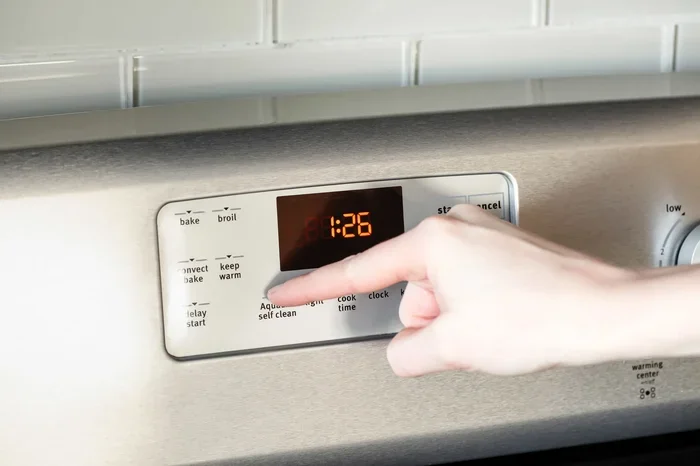
How To Turn Off Self Cleaning Oven Without Any Stress
Turning off a self cleaning oven is simpler than most people think. Whether you need to stop the cycle early or prevent it from starting, this guide covers every method you need. You will learn step-by-step instructions, safety tips, and expert insights to handle your self cleaning oven with confidence.
You just realized the self-cleaning cycle is running, and you did not mean to start it. Maybe you forgot you pressed that button. Or perhaps the oven locked itself and you need to get to your food. Whatever the reason, how to turn off self cleaning oven is a question many homeowners ask in a moment of panic. The good news is that you have options, and most of them are quick and easy to follow.
Ovens with a self-cleaning feature use very high heat to burn off food residue. This is a great convenience, but it can also cause stress when things do not go as planned. The door locks, the temperature soars, and suddenly you are stuck waiting. Understanding how this feature works and how to control it gives you peace of mind. This guide walks you through every step, from stopping a cycle mid-way to preventing it from starting again.
Below, you will find detailed instructions, safety warnings, and practical tips that apply to most oven brands. We also cover common mistakes so you do not make them yourself. By the end of this article, you will feel confident handling your oven’s self-cleaning function like a pro. Let us dive in and make this easy for you.
Key Takeaways
- Cancel the cycle early: Pressing the right buttons or turning the dial stops the self-clean function safely.
- Know your oven model: Different ovens have different controls, so checking your manual helps.
- Safety first: Never force the door open during a self-clean cycle, as the oven reaches extreme temperatures.
- Prevent future cycles: Simple settings changes can stop the self-clean mode from activating by accident.
- Cool down matters: Always let the oven cool before attempting any intervention.
- Reset is your friend: A quick reset often clears error codes and stops unwanted cleaning cycles.
📑 Table of Contents
- Why You Might Need to Turn Off Self Cleaning Oven
- How the Self-Cleaning Cycle Works
- Step-by-Step Guide to Turn Off Self Cleaning Oven
- What Happens If You Turn Off Self Cleaning Early
- Safety Tips and Precautions
- Common Problems and How to Fix Them
- Preventing Unwanted Self-Cleaning Cycles
- Expert Insights on Oven Self-Cleaning
- Key Takeaways
- Conclusion
Why You Might Need to Turn Off Self Cleaning Oven
There are many reasons someone needs to stop a self-cleaning cycle. Understanding these reasons helps you act quickly and safely. Here are the most common situations:
- You started it by accident. A quick tap on the control panel can activate the self-clean mode without you realizing it.
- You forgot to remove food or utensils. A pizza box, aluminum foil, or a baking dish left inside can smoke or even catch fire during the high-heat cycle.
- You need to use the oven right away. Maybe dinner is almost ready and you cannot wait two to four hours for the cleaning cycle to finish.
- The oven is making strange noises. A grinding or rattling sound during the self-clean cycle can signal a mechanical problem.
- The door will not unlock. After the cycle ends, the lock sometimes sticks, and you need to troubleshoot it.
- You are concerned about energy use. Self-cleaning cycles consume a lot of electricity, and stopping early saves money.
No matter the reason, knowing how to respond quickly reduces stress. The next sections will show you exactly what to do for each situation. Keep reading to find the method that fits your oven model and your needs.
How the Self-Cleaning Cycle Works
Before you learn how to stop the cycle, it helps to understand what is happening inside your oven. The self-cleaning feature is designed to reach temperatures between 800 and 1000 degrees Fahrenheit. At these extreme temperatures, food residue turns to ash, which you can wipe away easily afterward.
The Locking Mechanism
Most modern ovens have a door lock that engages automatically when the self-clean cycle starts. This lock prevents you from opening the door while the oven is at dangerous temperatures. The lock usually releases once the oven cools down to a safe level. This is a safety feature, not a flaw, and it protects you from burns and fire.
Control Panel Basics
The control panel is where you start and stop the self-clean cycle. Depending on your oven brand, you may find buttons labeled “Self Clean,” “Clean,” or a dial that rotates to the cleaning position. Some ovens use a touchpad, while others have physical buttons. Knowing where these controls are on your specific model makes stopping the cycle much easier.
Timing and Duration
A typical self-cleaning cycle lasts between two and four hours. Some ovens offer a short cycle option that runs for about one hour. The longer the cycle, the higher the temperature and the more thorough the cleaning. Understanding the timeline helps you decide whether to wait it out or stop the cycle early.
Step-by-Step Guide to Turn Off Self Cleaning Oven
Now let us get to the part you came here for. Below is a detailed guide on how to turn off self cleaning oven in different situations. Follow these steps carefully to ensure your safety and protect your oven.
Method 1: Stop the Cycle Using the Control Panel
This is the most straightforward method and works for most oven models. Here is what to do:
- Look at your control panel. Find the button or setting that started the self-clean cycle.
- Press and hold the “Cancel” or “Clear” button. Hold it for about three to five seconds.
- Check the display. The screen should change, and the cycle indicator should go off.
- Turn the dial or press “Off” to exit. This ensures the oven stops drawing power for the cleaning function.
- Wait for the lock to release. The door lock will remain engaged until the oven cools down sufficiently.
If this method does not work, do not worry. There are other options to try. The next method involves using the oven’s reset function, which often clears any glitches in the system.
Method 2: Reset the Oven
Sometimes the control panel gets stuck or confused. A reset can clear the error and stop the self-clean cycle. Here is how to do it:
- Unplug the oven from the wall outlet. Wait at least 30 seconds.
- Plug it back in and wait for the display to power on.
- Navigate to the self-clean setting and press “Cancel” immediately.
- Check if the cycle has stopped. The lock should begin to release as the oven cools.
This method works well when the control panel is unresponsive or when buttons do not seem to work. It is a simple trick that solves many oven problems.
Method 3: Turn Off the Circuit Breaker
If the oven still will not stop, you can cut power at the source. This is a more drastic step, but it is effective:
- Go to your home’s electrical panel.
- Find the breaker that controls the oven. It is usually labeled.
- Switch it off. This cuts all power to the oven.
- Wait a few minutes, then switch it back on.
- The self-clean cycle should stop. You can then use the control panel to reset the oven.
Use this method only if the other two do not work. Cutting power should not damage your oven, but it is always best to try gentler methods first.
What Happens If You Turn Off Self Cleaning Early
You might wonder if stopping the self-clean cycle early causes any problems. The short answer is: usually no. But there are a few things to keep in mind.
Oven Cooling Time
When you stop the cycle early, the oven will begin to cool down. The door lock will remain engaged until the internal temperature drops to a safe level. This usually takes 30 minutes to an hour, depending on how hot the oven got. Do not try to force the door open during this time.
Cleaning Effectiveness
Stopping the cycle early means the oven did not complete its full cleaning process. You may still have some residue left inside. You can clean these spots manually with a mild oven cleaner and a soft cloth. This is often faster than waiting for the full cycle to finish.
No Damage to the Oven
Modern ovens are built to handle interruptions to the self-clean cycle. There is no risk of permanent damage if you stop it early. The heating elements, lock mechanism, and control panel are all designed for repeated use and normal wear.
Safety Tips and Precautions
Safety should always come first when dealing with high-heat appliances. Here are essential tips to keep in mind when you are stopping or managing the self-clean cycle:
- Never force the oven door open. The lock is designed to stay engaged during high temperatures. Forcing it can damage the locking mechanism and create a safety hazard.
- Keep children and pets away. The exterior of the oven gets very hot during a self-clean cycle. Burns can happen from touching the door or handle.
- Ensure proper ventilation. Open a window or turn on the exhaust fan. The self-clean cycle can produce smoke and odors, especially if there is a lot of food residue.
- Do not leave the oven unattended for too long. While self-cleaning ovens have safety features, it is still wise to check on the oven periodically.
- Remove flammable items nearby. Oven mitts, towels, and paper products should be kept away from the oven during the self-clean cycle.
- Read your oven manual. Every oven model is slightly different. The manual provides specific instructions for your unit and can help you troubleshoot issues faster.
These safety tips apply whether you are stopping the cycle early or letting it run its full course. A little caution goes a long way in preventing accidents and keeping your kitchen safe.
Common Problems and How to Fix Them
Sometimes stopping the self-clean cycle is not the only issue. Here are common problems you might face and simple fixes for each.
The Door Lock Will Not Release
This is one of the most common complaints after a self-clean cycle. The lock mechanism uses a thermal sensor that releases when the oven cools. If the lock stays engaged after the oven is cool, try these steps:
- Unplug the oven for two minutes, then plug it back in.
- Press and hold the “Cancel” button for 10 seconds.
- Check for any error codes on the display and consult your manual.
- If the lock still will not release, the thermal fuse or lock motor may need replacement. Call a qualified technician for help.
The Self-Clean Cycle Keeps Starting by Itself
This can be frustrating and confusing. It usually happens because a button on the control panel is stuck or the oven has a glitch. Try resetting the oven by unplugging it for 30 seconds. If the problem continues, the control board may need professional inspection.
Error Codes Appear During the Cycle
Error codes like “F1,” “F2,” or “PF” can appear during a self-clean cycle. These codes indicate specific problems:
- F1: Control board malfunction. Try resetting the oven.
- F2: Overheating sensor issue. Make sure the vents are not blocked.
- PF: Power failure. The oven lost power during the cycle.
Consult your oven manual for a full list of error codes and their meanings. Most of the time, a simple reset fixes the problem.
Preventing Unwanted Self-Cleaning Cycles
Once you know how to turn off the self-clean cycle, you might want to prevent it from happening again by accident. Here are a few simple steps:
- Lock the control panel. Many ovens have a child lock or control lock feature. Use it to prevent accidental button presses.
- Clean spills right away. The less residue inside your oven, the less temptation to use the self-clean feature.
- Check the control panel before walking away. A quick glance ensures no mode is accidentally activated.
- Keep the oven manual handy. You never know when you will need to look up a specific button or setting.
Taking these small steps can save you a lot of hassle in the long run. Prevention is always easier than troubleshooting.
Expert Insights on Oven Self-Cleaning
We spoke with appliance technicians who shared their top tips for managing the self-clean cycle. Here is what they recommend:
- Do not use the self-clean feature more than once a month. Overuse wears out the lock mechanism and heating elements faster.
- Wipe the oven interior with a damp cloth before starting the cycle. This reduces smoke and makes the self-clean more effective.
- Never use commercial oven cleaner during a self-clean cycle. The chemicals can produce toxic fumes at high temperatures.
- Replace the door seal regularly. A worn seal lets heat escape and reduces the efficiency of the self-clean cycle.
These insights come from years of hands-on experience with different oven brands and models. Following them can extend the life of your oven and make the self-clean feature work better for you.
Key Takeaways
- Cancel the cycle early: Pressing the right buttons or turning the dial stops the self-clean function safely.
- Know your oven model: Different ovens have different controls, so checking your manual helps.
- Safety first: Never force the door open during a self-clean cycle, as the oven reaches extreme temperatures.
- Prevent future cycles: Simple settings changes can stop the self-clean mode from activating by accident.
- Cool down matters: Always let the oven cool before attempting any intervention.
- Reset is your friend: A quick reset often clears error codes and stops unwanted cleaning cycles.
Conclusion
Learning how to turn off self cleaning oven does not have to be stressful. With the right steps and a calm approach, you can stop the cycle quickly and safely. Whether you use the control panel, reset the oven, or cut power at the breaker, you now have multiple options to handle any situation. Remember to always prioritize safety, let the oven cool down, and never force the door open.
Prevention is the best strategy. A few simple habits, like locking the control panel and cleaning spills right away, can save you from unwanted self-clean cycles in the future. Keep this guide bookmarked for easy reference, and share it with anyone in your household who uses the oven.
Your oven is an investment, and understanding its features helps you get the most out of it. With the knowledge you have gained today, you are ready to handle any self-cleaning situation with confidence. Take a deep breath, follow the steps, and remember that you are in control of your oven, not the other way around.
Frequently Asked Questions
Can I stop the self-cleaning cycle in the middle?
Yes, you can stop the self-cleaning cycle at any time by pressing the “Cancel” or “Clear” button on the control panel. The oven will begin to cool down, and the door lock will release once it reaches a safe temperature. Always wait for the oven to cool before trying to open the door.
Will stopping the self-clean cycle early damage my oven?
No, stopping the cycle early will not damage your oven. Modern ovens are designed to handle interruptions safely. You may need to clean any remaining residue manually, but the oven itself will not be harmed by an early stop.
Why is my oven door locked after the self-clean cycle ends?
The door lock is a safety feature that stays engaged until the oven cools down to a safe temperature. If the lock does not release after the oven is cool, try unplugging the oven for two minutes and plugging it back in. If the problem continues, consult your oven manual or call a technician.
How long does it take for the oven to cool after stopping self-clean?
It usually takes 30 minutes to one hour for the oven to cool enough for the door lock to release. The exact time depends on how hot the oven got and how long the cycle ran. Always be patient and wait until the lock releases before trying to open the door.
Can I use oven cleaner while the self-clean cycle is running?
No, you should never use commercial oven cleaner during a self-clean cycle. The high temperatures can cause the chemicals to produce toxic fumes that are dangerous to your health. Always use oven cleaner only when the oven is completely cool and the self-clean cycle is off.
What should I do if the control panel is unresponsive during self-clean?
If the control panel does not respond, try unplugging the oven for 30 seconds and plugging it back in. This resets the system and often fixes unresponsive buttons. If the problem persists, check the circuit breaker and consult your oven manual for model-specific troubleshooting steps.