Why Is My Ninja Coffee Maker Beeping And Wont Stop
A Ninja Coffee Maker that won’t stop beeping usually signals a simple issue like a full water reservoir, a needed descaling alert, or a stuck brew button. Most beeping problems are easy to fix at home with basic troubleshooting steps. Understanding what the beeps mean saves you time, stress, and unnecessary repair costs. This guide covers every common reason your machine keeps sounding the alarm and gives you clear, actionable fixes.
You just walked into the kitchen, and there it is. That loud, relentless beeping from your Ninja Coffee Maker. It won’t stop. You press a button, you unplug it, you walk away — and it keeps going. It’s frustrating, right? You’re not alone. Thousands of owners deal with this exact problem every week.
The good news? A beeping Ninja coffee machine almost always has a clear, fixable cause. Whether it’s a full water tank, a needed cleaning cycle, or a simple glitch, your machine is trying to tell you something. And once you understand the language, the fix is usually quick and painless.
In this guide, we break down every reason your Ninja coffee maker beeping won’t stop. We cover error codes, common alerts, and step-by-step fixes you can do right now. No guesswork. No expensive repair bills. Just clear answers that bring peace back to your morning routine.
Key Takeaways
- Beeping Means Something Needs Your Attention: Your Ninja Coffee Maker uses beep codes to communicate issues like empty reservoirs, clogged filters, or overheating.
- Descaling Is a Top Culprit: Mineral buildup triggers persistent alerts that won’t stop until you run a descaling cycle.
- Most Fixes Take Under Five Minutes: Simple steps like resetting the machine, checking water levels, or cleaning the carafe often solve the problem instantly.
- Don’t Ignore Error Codes: Blinking lights and beep patterns point to specific problems. Learning to read them prevents bigger breakdowns.
- Regular Maintenance Keeps It Quiet: Routine cleaning and proper use extend your machine’s life and reduce annoying alerts.
- When to Call for Help: Some beeping issues need professional service, especially electrical or control board problems.
📑 Table of Contents
Why Is My Ninja Coffee Maker Beeping And Wont Stop
Your Ninja coffee maker won’t stop beeping because it’s trying to communicate with you. Unlike a simple on-off machine, modern Ninja brewers come packed with sensors, indicators, and smart alerts. These features help you brew better coffee, but they also mean more things can trigger an alarm.
The beeping pattern matters. A short double-beep means something different than a long continuous alarm. Once you learn what each sound means, you can troubleshoot faster and get back to your morning cup. Let’s dive into the most common reasons.
1. The Water Reservoir Is Empty or Low
This is the number one reason any coffee maker keeps beeping. Your Ninja machine has a water level sensor. When the water drops below the minimum line, the machine beeps to warn you. It’s simple, but easy to miss if you’re rushing in the morning.
Check the reservoir right now. Is the water line below the “MIN” marker? Fill it up to the “MAX” line and the beeping should stop within seconds. This is one of the fastest fixes you’ll ever find.
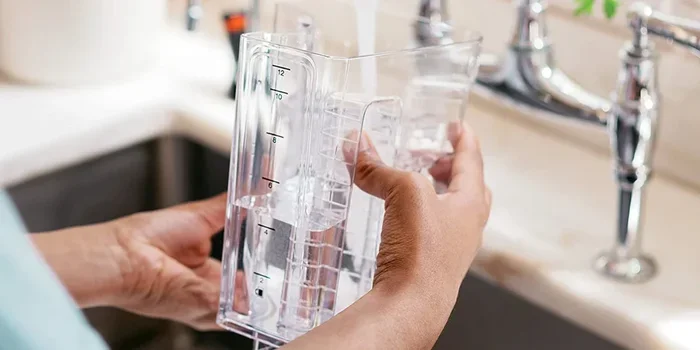
Here’s a quick tip: some Ninja models have a removable reservoir. Take it out, refill it at the sink, and pop it back in. Make sure it clicks into place properly. A loose reservoir can trick the sensor into thinking there’s no water, even when the tank is full.
2. Descaling Alert Is Active
If you’ve been brewing coffee for weeks without cleaning the inside of your machine, the descaling light is probably flashing. Mineral deposits from tap water build up inside the heating element and tubes. Your Ninja detects this and sounds an alert to protect the machine.
The beeping won’t stop until you run a descaling cycle. Here’s how to do it quickly:
- Empty the water reservoir completely.
- Mix a descaling solution (or white vinegar and water) in a 1:1 ratio.
- Fill the reservoir with the mixture.
- Place a large mug on the drip tray.
- Run a full brew cycle without coffee grounds.
- Repeat with fresh water until the reservoir runs clear.
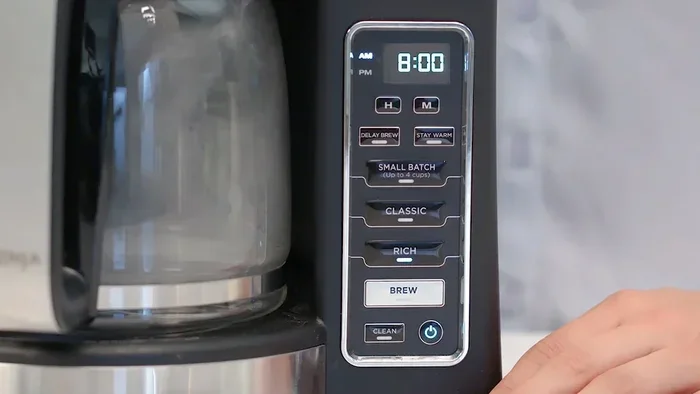
After descaling, the beeping should stop and the light will turn off. If it doesn’t, hold the power button for five seconds to reset the alert. This is one of the most common reasons a Ninja coffee maker beeping issue keeps coming back.
3. The Carafe Is Not Properly Seated
Your Ninja machine has a safety feature that stops brewing if the carafe isn’t sitting correctly on the warming plate. The sensor thinks no carafe is present, and it beeps to let you know. This happens more often than you’d think, especially after a quick pour.
Lift the carafe off the plate and set it back down slowly. Make sure it’s centered and the handle is aligned with the machine’s groove. You should feel a slight click when it locks into place. The beeping should stop immediately.
Also check the carafe lid. Some Ninja models won’t start brewing — or will keep alerting — if the lid isn’t fully closed. A loose lid can cause steam leaks and trigger safety beeps.
4. The Brew Basket or Filter Is Clogged
Coffee grounds and oils build up over time. If your brew basket or reusable filter is clogged, water can’t flow through properly. The machine senses this blockage and beeps to alert you. Left unchecked, this can lead to overflow or even damage to the internal pump.
Remove the brew basket and rinse it under warm water. Use a soft brush to scrub away any stuck grounds. Check the filter too — paper filters should be replaced after every use, and reusable filters need a thorough wash at least once a week.
While you’re at it, wipe down the drip tray. Coffee overflow from a clogged basket can spill onto the heating element, causing sticky buildup that triggers more beeping alerts later.
5. Overheating or Prolonged Use
Ninja coffee makers have built-in thermal protection. If you run multiple brew cycles back-to-back without a break, the internal temperature rises. The machine beeps to tell you it needs time to cool down. This is a safety feature, not a malfunction.
Unplug the machine and let it rest for 15 to 20 minutes. When the internal temperature drops, the beeping will stop. Going forward, try to space out your brew cycles by at least 10 minutes to avoid triggering this alert.
If the overheating beep happens after just one cycle, the ambient temperature in your kitchen might be too high. Keep your coffee maker away from direct sunlight, ovens, and other heat sources. This is similar to how you’d troubleshoot an oven that isn’t heating properly — heat management matters for all kitchen appliances.
6. Control Panel Glitch or Software Error
Yes, coffee makers have software now. Modern Ninja coffee bar models use microprocessors to control brewing temperature, timing, and strength settings. Sometimes the software glitches, and the machine enters an error state that causes continuous beeping.
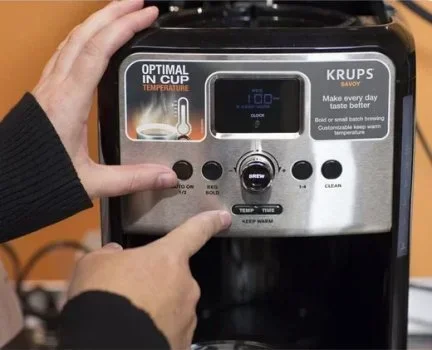
The fix is simple: a hard reset. Unplug the machine from the wall outlet — not just turning it off with the button. Wait 60 seconds, then plug it back in. This clears the temporary memory and resets the control board. In most cases, the beeping stops right away.
If a reset doesn’t work, try holding down the power and brew buttons simultaneously for 10 seconds. Some Ninja models have a hidden reset combination that only works with this specific button press. Check your user manual for the exact sequence.
7. The Water Filter Needs Replacement
Ninja machines with built-in water filtration systems have a filter indicator. When the filter reaches the end of its lifespan, the machine beeps to remind you. A clogged or expired filter restricts water flow and affects brewing temperature.
Replacing the filter is easy. Open the reservoir lid, remove the old filter cartridge, and insert a new one. Soak the new filter in clean water for 15 minutes before first use. The beeping should stop once the machine recognizes the fresh filter.
Mark your calendar for the next replacement. Most Ninja water filters last about 60 brew cycles, or roughly two months for daily users. Staying on top of this small task keeps your coffee tasting fresh and your machine running quietly.
8. The Carafe Lid Sensor Is Dirty
Some Ninja models use an infrared sensor to detect whether the carafe lid is closed. Over time, coffee residue and dust can coat the sensor, causing false readings. The machine thinks the lid is open and beeps continuously.
Take a soft, damp cloth and gently wipe the sensor area around the lid cradle. Clean both the sensor itself and the lid’s contact point. A quick cleaning like this often solves what looks like a serious electrical problem.
9. Electrical or Power Supply Issues
If none of the above fixes work, the problem might be electrical. A loose power cord, a faulty outlet, or a damaged power supply can cause erratic beeping. Your machine struggles to maintain stable power and signals the issue through repeated alerts.
Try plugging the coffee maker into a different outlet. Check the power cord for visible damage or fraying. If you have a surge protector, plug the machine directly into the wall to rule out power fluctuations. Sometimes a simple outlet change eliminates the beeping completely.
If the problem persists even with a direct wall connection, the internal power supply board may need replacement. This is a less common issue, but it does happen, especially with older machines.
Understanding Ninja Coffee Maker Beep Patterns
Not all beeps are the same. Your Ninja machine uses different patterns to communicate different messages. Learning to read these patterns helps you troubleshoot faster and avoid unnecessary panic.
Short Double Beep
A short double beep usually means the machine is ready to brew or that a cycle has finished. This is normal and nothing to worry about. Some models also use this sound to confirm a button press.
Continuous Long Beep
A long, unbroken beep signals an error or alert. This could mean an empty reservoir, an improperly seated carafe, or an overheating warning. Stop what you’re doing and check the basics first — water level, carafe placement, and brew basket.
Intermittent Beeping
Beeping that comes and goes often points to a sensor issue. The machine can’t get a consistent reading from one of its internal sensors. A dirty sensor, a loose connection, or a failing part could be the cause. Try cleaning all sensors and removable parts first.
Three or More Short Beeps
This pattern usually indicates a specific error code. Check your user manual for the code chart. Common codes point to issues with the heating element, water pump, or control board.
Quick Tips to Prevent Future Beeping
Prevention is always easier than troubleshooting. Follow these simple habits to keep your Ninja coffee maker quiet and running smoothly:
- Clean after every use: Rinse the carafe, brew basket, and filter after each brew cycle.
- Descale monthly: Run a vinegar or descaling solution cycle at least once a month.
- Use filtered water: Tap water contains minerals that build up fast. Filtered water reduces scale buildup significantly.
- Replace filters on schedule: Don’t wait until the beeping starts. Change your water filter every two months.
- Don’t overfill the reservoir: Stay between the MIN and MAX lines to avoid overflow and sensor confusion.
- Let the machine cool between cycles: Give it at least 10 minutes of rest after heavy use.
- Wipe the sensor area regularly: A quick wipe with a damp cloth keeps infrared sensors working properly.
Common Mistakes That Trigger Beeping
Many owners accidentally cause beeping alerts without realizing it. Here are the most common mistakes and how to avoid them:
Mistake 1: Forgetting to seat the carafe. It sounds silly, but a carafe that’s even slightly off-center will trigger the safety sensor. Always listen for the click when placing the carafe down.
Mistake 2: Using the wrong water level. Brewing with too little water can cause the machine to run dry and overheat. Too much water causes overflow and sensor errors. Always stay within the marked lines.
Mistake 3: Skipping regular cleaning. Coffee oils and mineral deposits build up fast. A machine that isn’t cleaned regularly will beep more often and eventually develop bigger problems. Think of it like maintaining nonstick cookware oven safety — regular care prevents long-term damage.
Mistake 4: Ignoring error codes. When your machine flashes a specific error code, don’t just reset it and move on. Look up the code in your manual. Ignoring it can turn a small fix into an expensive repair.
Mistake 5: Using vinegar without rinsing. If you descale with vinegar, always run two to three plain water cycles afterward. Leftover vinegar taste in your coffee is unpleasant, and residual acidity can damage internal seals over time.
Expert Insights: When to Call a Professional
Most Ninja coffee maker beeping problems are simple and fixable at home. But some situations call for professional help. If you’ve tried every fix in this guide and the beeping continues, it’s time to escalate.
Here are signs that your machine needs expert attention:
- The beeping started after a power surge or electrical storm.
- You notice a burning smell or visible smoke.
- The machine leaks water from the bottom or sides.
- The heating element no longer produces hot water.
- The control panel is unresponsive to any button presses.
These symptoms suggest internal electrical damage or component failure. A certified technician can diagnose the exact problem and replace the faulty part safely. Never open the machine’s housing yourself — you risk voiding the warranty and injuring yourself.
Also, if your machine is still under warranty, contact Ninja customer service first. They can often troubleshoot over the phone and arrange a free replacement or repair. Keep your proof of purchase handy when you call.
How Your Ninja Coffee Maker Compares to Other Brands
Every coffee maker brand uses alert systems differently. Understanding how your Ninja compares helps you appreciate why it beeps the way it does:
| Brand | Alert Type | Common Beep Trigger | Reset Method |
|---|---|---|---|
| Ninja | Beeps + flashing lights | Water level, descaling, carafe sensor | Unplug for 60 seconds |
| Keurig | Beeps + screen message | Water reservoir, needle clog | Hold power for 10 seconds |
| Breville | Beeps + error code display | Steam wand, temperature sensor | Hold brew button 5 seconds |
| Hamilton Beach | Beeps only | Carafe not detected, empty reservoir | Press and hold cancel |
Ninja machines are more feature-rich than most budget brands, which means more sensors and more potential alert triggers. The trade-off is better coffee quality and more customization. The key is staying on top of maintenance so the alerts stay rare.
Final Thoughts
A Ninja coffee maker beeping and won’t stop is almost always a minor issue with a simple fix. Whether it’s a low water level, a needed descaling cycle, or a carafe that needs reseating, the solution is usually within minutes. The key is understanding what your machine is trying to tell you.
Take a breath. Check the basics first — water, carafe, filter, and cleanliness. If those don’t solve it, try a reset. And if nothing works, don’t hesitate to reach out to Ninja support or a qualified technician.
Your coffee maker works hard every day to give you that perfect morning brew. A little attention and regular care go a long way toward keeping it quiet, efficient, and ready when you need it most. Now go enjoy that cup of coffee in peace.
Frequently Asked Questions
Why does my Ninja Coffee Maker beep three times and stop?
Three short beeps usually indicate a specific error code related to the heating element or water pump. Check your user manual for the code chart that matches this pattern. In most cases, a simple reset by unplugging the machine for 60 seconds clears the code.
How do I stop my Ninja coffee maker from beeping after descaling?
After running a descaling cycle, the alert light sometimes stays on. Run two to three full cycles of plain water to flush the system completely. Then hold the power button for five seconds to reset the descale indicator. The beeping should stop immediately.
Can a Ninja Coffee Maker beep if the carafe lid isn’t closed properly?
Yes, absolutely. Many Ninja models have a safety sensor that detects whether the carafe lid is fully sealed. If the lid is even slightly open or misaligned, the machine beeps to prevent spills and burns. Press the lid down firmly until you hear it click into place.
Is it normal for a Ninja Coffee Maker to beep when the water filter needs replacing?
Yes, this is completely normal. Ninja machines with built-in water filters track filter usage and alert you when it’s time for a replacement. The beeping typically starts after about 60 brew cycles. Replacing the filter with a genuine Ninja replacement cartridge stops the alert.
What should I do if my Ninja Coffee Maker beeps and won’t brew?
First, check that the water reservoir is filled above the minimum line. Next, confirm the carafe is properly seated on the warming plate. If both are fine, try unplugging the machine for 60 seconds and plugging it back in. If the problem persists, the brewing mechanism may need professional inspection.
How often should I descale my Ninja Coffee Maker to prevent beeping alerts?
Most Ninja experts recommend descaling every one to three months, depending on how often you brew and how hard your tap water is. If you use filtered water, you can stretch the interval to three months. Running a descaling cycle regularly prevents mineral buildup that triggers persistent beeping alerts.