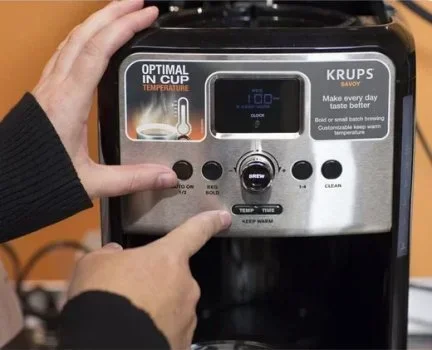
How To Program Your Krups Coffee Maker Step By Step
Programming your Krups coffee maker is simple once you know the right steps. This guide walks you through every setting, from the brew timer to strength controls, so you can wake up to fresh coffee every morning. You will learn how to set the clock, program a brew schedule, adjust coffee strength, and troubleshoot common issues with your Krups coffee machine.
There is nothing quite like walking into the kitchen and smelling fresh coffee already brewing. A programmable Krups coffee maker makes that possible every single morning. Whether you have a Krups filter machine, an espresso model, or a simple drip brewer, learning to program it opens up a whole new level of convenience.
Many people never fully explore the buttons and settings on their coffee maker. They end up using just the basic on-off switch. But your Krups machine likely has a clock, a timer, a strength selector, and possibly even a pause-and-serve feature. Once you learn how to use these, your morning routine becomes smoother and more enjoyable.
This guide breaks down everything you need to know about how to program Krups coffee maker units. We cover the basics, the advanced settings, and common problems you might face. By the end, you will feel confident programming your machine like a pro.
Key Takeaways
- Easy Setup: Programming your Krups coffee maker takes just a few minutes and no special tools.
- Custom Brew Times: You can set a delayed brew timer so your coffee is ready when you wake up.
- Strength Controls: Adjust the brew strength to match your personal taste preference every morning.
- Maintenance Matters: Regular cleaning keeps your programmable coffee maker running smoothly and tasting great.
- Troubleshooting Is Simple: Most programming issues have quick fixes you can do at home.
- Save Time Daily: A programmed coffee maker removes the morning hassle and gives you a consistent cup every day.
📑 Table of Contents
- Getting To Know Your Krups Coffee Maker
- Step-by-Step Guide To Programming Your Krups Coffee Maker
- Advanced Programming Features
- Common Programming Problems And How To Fix Them
- Tips For Getting The Best Results From Your Programmable Coffee Maker
- Why Programming Your Coffee Maker Changes Your Mornings
- Conclusion
Getting To Know Your Krups Coffee Maker
Before you start pressing buttons, it helps to understand what your machine can do. Different Krups models have different features, but most programmable coffee makers share a similar layout. Familiarizing yourself with the parts and controls makes the programming process much easier.
Basic Controls You Will Find
Most Krups coffee makers have a few key controls on the front or side panel. These typically include a power button, a clock display, a program button, and a strength selector. Some models also have a brew pause feature, which lets you remove the carafe mid-brew without making a mess.
The clock display is the foundation of all programming. If the clock is not set correctly, your timer and schedule will not work. Always start by setting the time before you try anything else. This small step makes a big difference.
The program button is where the magic happens. It lets you tell the machine when to start brewing. You can usually set it for the same time every day or choose different times for different days. This is perfect for weekday mornings when you need that extra few minutes of sleep.
Understanding Your Model
Krups makes many different coffee maker models. Some are simple drip machines, while others have built-in grinders and espresso capabilities. The programming steps may vary slightly depending on which model you own. Check your user manual for model-specific details, but the general principles remain the same across most Krups machines.
If you have lost your manual, do not worry. Most Krups models follow a similar programming logic. You set the clock, press the program button, choose your brew time, and save the settings. That is the basic process for nearly every programmable coffee maker from Krups.
Step-by-Step Guide To Programming Your Krups Coffee Maker
Now let us get into the actual programming steps. Follow along carefully, and you will have your machine set up in no time. The process is straightforward and does not require any technical skills.
Step 1: Clean Your Machine First
Before you program anything, make sure your coffee maker is clean. Run a quick rinse cycle with fresh water. This removes any dust or residue that may have built up during storage or shipping. A clean machine brews better-tasting coffee and lasts longer.
For a deeper clean, you can run a vinegar and water solution through the machine. This removes mineral buildup from the internal components. Keeping your coffee maker clean is one of the best ways to maintain its performance over time. If you want more tips on cleaning kitchen appliances, check out this guide on how to clean a Cosori Air Fryer Toaster Oven for general appliance cleaning advice.
Step 2: Set The Clock
Plug in your Krups coffee maker and press the clock button. Use the hour and minute buttons to set the current time. Make sure you get the AM and PM correct, as this affects your scheduled brew times.
Some Krups models use a 24-hour display, while others show AM and PM. Check your display carefully. Once the clock is set, the machine is ready to accept programming commands. This step is essential because every timer you set later depends on the clock being accurate.
Step 3: Press The Program Button
Find the program button on your control panel. Press it once to enter programming mode. The display should show a blinking indicator, which means the machine is ready to accept your brew time settings.
On some models, you may need to hold the program button for a few seconds. Refer to your manual if the screen does not respond. Once you are in programming mode, you can set the time you want the coffee to start brewing.
Step 4: Set Your Brew Time
Use the hour and minute buttons to set the time you want your coffee to be ready. For example, if you wake up at 7:00 AM, set the brew time for 6:50 AM. This gives the machine about ten minutes to brew a full pot.
Most Krups coffee makers allow you to set the program for every day of the week. You can also choose to program it only for weekdays. This flexibility is one of the best features of a programmable coffee maker. You get fresh coffee on demand without any morning effort.
Step 5: Adjust The Brew Strength
Many Krups models come with a strength selector. This lets you choose between regular and bold coffee. The machine adjusts the water flow and brew time to change the flavor intensity.
If you prefer a stronger cup, select the bold setting. For a lighter taste, choose regular. You can change this setting at any time. Some advanced Krups espresso machines even let you adjust the grind size and extraction time for even more control over your coffee.
Step 6: Save And Confirm Your Settings
After you have set the time and strength, press the program button again to save your settings. The display should stop blinking and confirm the program is active. Your Krups coffee maker is now ready to brew automatically at the time you set.
To test your program, fill the water reservoir and add ground coffee to the filter. Wait for the scheduled brew time and check that the machine starts on its own. If it does, you are all set. If not, double-check your clock and program settings.
Advanced Programming Features
Once you have the basics down, you can explore the advanced features that make your Krups coffee maker even more useful. These features add convenience and customization to your daily coffee routine.
Setting Multiple Brew Times
Some Krups models let you program different brew times for different days. This is great if your schedule changes throughout the week. For example, you might want coffee at 6:30 AM on weekdays but sleep in on weekends.
To set multiple brew times, enter programming mode and adjust the time for each day individually. This feature takes a few extra minutes to set up but pays off in convenience. You will not have to worry about making coffee on days when you do not need it.
Using The Brew Pause Feature
The brew pause feature is a handy addition to most Krups coffee makers. It lets you remove the carafe mid-brew to pour a cup while the rest of the coffee continues to brew.
To use this feature, simply lift the carafe off the warming plate during the brewing cycle. The machine pauses automatically. Replace the carafe, and brewing resumes. This feature works best when you pour slowly to avoid dripping.
Programming The Auto Shut-Off
Many Krups coffee makers have an auto shut-off feature. This turns the machine off after a set period, usually two or four hours, after brewing is complete. It saves energy and adds a layer of safety to your kitchen.
To program the auto shut-off, look for the timer or shut-off button on your control panel. Set the duration you prefer. If you are concerned about your appliance running too long, this feature gives you peace of mind. For more general appliance troubleshooting tips, you can read about how to tell if your oven is not heating properly for helpful diagnostic advice.
Common Programming Problems And How To Fix Them
Even the best coffee makers can have occasional issues. Programming problems are usually easy to fix. Here are the most common issues and their solutions.
The Clock Keeps Resetting
If your clock resets every time there is a power outage, you are not alone. This is a common issue with many coffee makers. The simplest fix is to reset the clock after every power interruption. Some people write a note on their machine as a reminder.
To prevent this from happening, consider plugging your coffee maker into a surge protector with battery backup. This keeps the clock running even during brief power outages. It is a small investment that saves a lot of frustration.
The Program Will Not Save
If your brew program does not save, the machine might not be in programming mode. Make sure you press the program button until the display starts blinking. Then set your desired time and press the button again to confirm.
Another common cause is low power. If the machine is not fully plugged in or if the outlet is loose, it may not hold the program settings. Check the power connection and try again. For more troubleshooting help, check out this guide on how to fix oven temperature for general appliance calibration tips.
The Coffee Tastes Weak Or Stronger Than Expected
If your coffee does not taste the way you programmed it, the strength setting might be off. Double-check that you have selected the correct strength level. Also, make sure you are using the right amount of coffee grounds for the water level.
The ratio of coffee to water matters a lot. A general rule is two tablespoons of ground coffee per six ounces of water. Adjust this ratio to match your taste. Over time, mineral buildup can also affect extraction and flavor, so regular descaling is important.
The Machine Does Not Start At The Scheduled Time
If your Krups coffee maker does not start at the programmed time, first check the clock. Make sure it shows the correct time and AM or PM setting. Then verify that the program is active and not overridden by a manual brew cycle.
Sometimes the carafe needs to be seated properly for the machine to start. Remove the carafe and place it back on the warming plate firmly. This simple step resolves the issue more often than you might think.
Tips For Getting The Best Results From Your Programmable Coffee Maker
A little extra care goes a long way in getting the most from your Krups coffee maker. These practical tips help you enjoy better coffee and keep your machine running smoothly.
- Use Fresh, Cold Water: Always fill the reservoir with fresh cold water before programming a brew. Hot water from the tap can affect the taste of your coffee.
- Clean The Filter Regularly: Remove and rinse the filter basket after every few uses. A clean filter allows water to flow evenly through the grounds.
- Descale Monthly: Run a descaling cycle with vinegar and water at least once a month. This removes calcium and mineral buildup that can clog the internal pipes.
- Store Coffee Properly: Keep your ground coffee in an airtight container away from heat and light. Fresh coffee grounds produce a much better cup than stale ones.
- Use The Right Grind Size: For drip coffee makers, a medium grind works best. Too fine and the coffee becomes bitter. Too coarse and it tastes weak.
- Replace Water Filters: If your Krups model has a water filter, replace it every two months. Clean water makes a noticeable difference in coffee flavor.
Taking a few minutes each week to maintain your machine keeps it in top condition. A well-maintained programmable coffee maker can last for many years of reliable service. The morning routine becomes something you actually look forward to instead of rushing through.
Why Programming Your Coffee Maker Changes Your Mornings
Once you experience the convenience of a programmed coffee maker, you will wonder how you ever managed without it. The ability to wake up to the smell of freshly brewed coffee is a game changer for morning routines.
Programming removes the decision-making from your morning. You do not have to think about starting the machine or waiting for it to brew. Simply walk into the kitchen and pour your first cup. This small convenience adds up to a much more relaxed start to your day.
For busy families, a programmable coffee maker is especially valuable. Multiple people can have their preferred brew times without any confusion. The auto shut-off feature also means no one has to worry about leaving the machine on all day. It is a win-win for convenience and safety.
The programming process might seem intimidating at first. But once you have done it a few times, it becomes second nature. Most people find that programming their Krups coffee maker takes less than five minutes. The time you invest pays back tenfold in saved mornings and better coffee.
Conclusion
Programming your Krups coffee maker is one of the simplest ways to improve your daily routine. With just a few button presses, you can set a custom brew schedule, adjust the strength, and enjoy fresh coffee without any morning effort. The steps are easy to follow, and the results are worth it.
Remember to set your clock first, press the program button, choose your brew time, adjust the strength, and save your settings. If you run into any issues, the troubleshooting tips in this guide should help you get back on track quickly.
Take a few minutes today to program your Krups coffee maker. Tomorrow morning, you will thank yourself when you walk into the kitchen and smell fresh coffee already brewing. A little setup now leads to many mornings of effortless enjoyment.
Frequently Asked Questions
Can I program my Krups coffee maker to brew at different times on different days?
Yes, many Krups models allow you to set different brew times for each day of the week. Simply enter programming mode and adjust the time for each day individually. Refer to your user manual for model-specific instructions on setting multiple programs.
How do I know if my Krups coffee maker is in programming mode?
When you press the program button, the clock display should start blinking. This indicates the machine is ready to accept brew time settings. If the display does not change, try holding the program button for a few seconds instead of pressing it once.
What should I do if my Krups coffee maker will not hold the programmed settings?
This usually happens when the clock is not set correctly or the power connection is loose. Make sure the machine is fully plugged in and the clock shows the correct time. If the problem continues, try unplugging the machine for thirty seconds and plugging it back in to reset the system.
How often should I descale my programmable Krups coffee maker?
You should descale your Krups coffee maker at least once a month. If you live in an area with hard water, you may need to descale more frequently. Regular descaling removes mineral buildup and keeps your coffee tasting fresh and clean.
Can I use ground coffee and pod coffee in the same Krups machine?
Some Krups models support both ground coffee and pods, but not all do. Check your machine’s specifications before trying both methods. Using the correct type of coffee for your model ensures the best flavor and prevents damage to the internal components.
Why does my programmed coffee taste different from a manual brew?
The programmed brew follows the same process as a manual brew, so the taste should be the same. If there is a difference, check the strength setting, the coffee-to-water ratio, and the cleanliness of your machine. Old or stale coffee grounds can also cause flavor differences.