Delonghi Coffee Machine Symbols Meaning Explained Simply
Understanding your Delonghi coffee machine symbols is easier than you think. This guide breaks down every light, icon, and error code on your display panel so you can brew with confidence. You will learn what each symbol means, how to fix common alerts, and simple maintenance tips to keep your machine running smoothly.
Key Takeaways
- Display symbols tell you exactly what your machine needs: from brewing status to error alerts and maintenance reminders.
- Descaling and decalcifying lights are the most common symbols: knowing when to act prevents buildup and extends machine life.
- Error codes are easy to decode: most Delonghi symbols point to simple fixes you can do at home.
- Regular maintenance keeps symbols from appearing: cleaning, descaling, and replacing filters on schedule prevents most issues.
- Understanding your specific model matters: different Delonghi machines have slightly different symbol sets, so always check your manual.
📑 Table of Contents
- Delonghi Coffee Machine Symbols Meaning Explained Simply
- Why Your Delonghi Machine Uses Symbols
- Common Delonghi Symbols and What They Mean
- Error Codes and Warning Lights on Delonghi Machines
- How to Interpret the Display Panel on Your Delonghi Machine
- Maintenance Symbols and What They Tell You
- Quick Tips for Decoding Delonghi Symbols
- Common Mistakes People Make With Delonghi Symbols
- Expert Insights on Delonghi Coffee Machine Symbols
- Conclusion
Delonghi Coffee Machine Symbols Meaning Explained Simply
If you have ever stared at your Delonghi coffee machine symbols and felt completely lost, you are not alone. Thousands of coffee lovers buy a Delonghi machine only to find a wall of tiny icons on the display panel. These symbols look like a secret code, but they are actually designed to help you. Every light, icon, and flashing symbol tells you something important about your machine. Once you learn the language, you will never feel confused again.
This guide breaks down the Delonghi coffee machine symbols meaning in plain English. We will cover every major symbol group, from power icons to error codes. You will also learn quick fixes, maintenance tips, and how to avoid common mistakes. Whether you own a Delonghi espresso machine, a drip coffee maker, or a bean-to-cup model, this guide has you covered. Let us turn those confusing little icons into something you actually understand.
Why Your Delonghi Machine Uses Symbols
Delonghi coffee machines use symbols because they speak to users worldwide. A picture icon works no matter what language you speak. This universal design makes the machines accessible to millions of people. The symbols also give you instant feedback without needing to read a long manual every time.
Most Delonghi machines have a small LED display or a series of indicator lights. These lights show you the current status of your machine. They tell you when the water tank is empty, when the coffee is brewing, and when the machine needs attention. Understanding these signals helps you use your machine more effectively and avoid unnecessary stress.
How Display Panels Work on Delonghi Machines
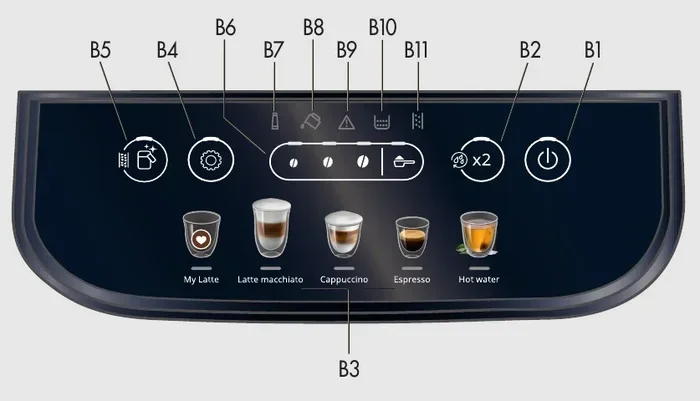
Delonghi machines come with different types of display panels. Basic models use simple LED lights. More advanced models have a digital screen with text and icons. Both types communicate the same core information. The key is learning what each symbol represents.
Here are the three main categories of symbols you will see on any Delonghi machine:
- Status symbols: These show what the machine is doing right now, like brewing or warming up.
- Alert symbols: These warn you about something, such as an empty water tank or a needed cleaning cycle.
- Error symbols: These indicate a problem that needs your attention before the machine can work again.
Common Delonghi Symbols and What They Mean
The most important thing to know about Delonghi coffee machine symbols meaning is that most symbols fall into a few predictable groups. Once you recognize these groups, you can interpret almost any icon on your machine. Let us walk through the most common symbols you will encounter.
Power and On/Off Symbols
Every Delonghi machine has a power symbol. It usually looks like a circle with a vertical line at the top. This is the universal power icon used on almost all electronic devices. When you press the power button, this symbol lights up to show the machine is on.
Some models also show a standby symbol. This looks like a crescent moon or a line with a gap. It means the machine is in low-power mode and ready to brew at any time. If you see this symbol, your machine is awake but not actively heating water yet.
Brewing and Coffee Type Symbols
Delonghi machines have symbols for different drink types. These icons make it easy to select what you want to drink. Common brewing symbols include:
- Espresso icon: A small cup shape, often with one or two waves rising from it. This tells you the machine is set to brew a single or double espresso shot.
- Coffee icon: A larger cup shape with steam rising. This represents a regular drip or filter coffee cycle.
- Hot water icon: A cup with wavy lines inside, meaning the machine is dispensing hot water for teas or americanos.
- Steam or milk froth icon: This looks like a swirl or steam lines above a cup. It indicates the steam wand is ready for frothing milk.
When you see one of these symbols light up on your display, the machine is preparing that specific drink. The symbol will usually turn off once the brewing cycle is complete.
Water and Tank Symbols
Water-related symbols are among the most important ones to understand. A water drop icon typically means the water tank is involved in the current process. If this symbol flashes, it usually means the tank is low or empty.
Some Delonghi models show a water filter icon. This looks like a small water drop with a line through it or a filter shape. When this light appears, it is time to replace your water filter. A clean filter ensures better-tasting coffee and protects the internal components of your machine.
Here is a quick comparison of water-related symbols:
| Symbol | Appearance | Meaning | Action Needed |
|---|---|---|---|
| Water Drop | Blue or white droplet shape | Water tank is active or in use | None needed during brewing |
| Low Water | Flashing water drop | Tank is nearly empty | Refill the water tank |
| Filter Reminder | Drop with filter icon | Time to replace water filter | Install a new filter |
| No Water Flow | Drop with an X or exclamation | Water is not flowing properly | Check tank and inlet valve |
Error Codes and Warning Lights on Delonghi Machines
Error symbols can feel intimidating, but they are actually your machine trying to communicate with you. Most Delonghi coffee machine symbols meaning for errors are straightforward once you know what to look for. The machine uses flashing lights or specific icon combinations to point you toward the problem.
Descaling and Decalcifying Symbols
The descaling symbol is one of the most common alerts you will see on a Delonghi machine. It usually looks like a scale or a drop with a buildup line through it. This symbol tells you that mineral deposits have built up inside the machine and need to be removed.
Descaling is essential for maintaining your Delonghi machine. Over time, calcium and lime build up in the heating elements and water lines. This buildup can slow down brewing, affect taste, and eventually damage the machine. When you see the descaling symbol, it is time to run a cleaning cycle.
If you are wondering how to handle this process, you can refer to our guide on how to decalcify a Keurig coffee maker for general descaling principles that apply to most coffee machines. While that article focuses on Keurig, the core descaling process is similar across brands. The key is to use the right descaling solution and follow the machine’s prompts on the display.
After descaling, the symbol should turn off automatically. If it stays on, try resetting the machine by holding the power button for a few seconds. This clears the reminder and lets you start fresh.
Temperature and Heating Symbols
Temperature-related symbols look like a thermometer or a series of rising lines. When you see this symbol, the machine is heating up to the correct brewing temperature. This process usually takes 30 seconds to a couple of minutes depending on the model.
Do not try to brew coffee while the heating symbol is still active. The machine needs to reach the right temperature first. Brewing too early can result in weak or under-extracted coffee. Wait until the symbol disappears and the brewing symbol appears.
Coffee Grinder Symbols
Bean-to-cup Delonghi machines include a grinder. The grinder symbol looks like a small burr or gear shape. When you see this icon, it means the machine is grinding beans to prepare your drink.
Some Delonghi models allow you to adjust the grind size. Finer grinds produce stronger espresso, while coarser grinds work better for longer coffee cycles. If you are curious about how grind settings affect your coffee, check out our article on whether a coffee grinder can be used for wet grinding. It explains how different grinding methods change the final cup of coffee.
On most Delonghi machines, the grinder symbol will flash while beans are being ground and then turn steady once grinding is complete. If the symbol stays on for too long, check that the bean hopper is not empty and that there is no blockage in the grinder chute.
How to Interpret the Display Panel on Your Delonghi Machine
The display panel on your Delonghi machine is like a dashboard in a car. It gives you all the information you need at a glance. Learning to read it quickly will save you time and frustration every morning.
Reading the Icon Sequence
Delonghi machines often show symbols in a specific sequence during the brewing process. Here is what a typical sequence looks like:
- Power symbol lights up when you turn the machine on.
- Heating symbol appears while the machine warms up.
- Drink type symbol lights up when you select your beverage.
- Brewing symbol shows the machine is actively making coffee.
- Ready symbol appears when your drink is complete.
Each step flows naturally into the next. If a symbol appears out of order or stays on too long, that usually indicates a problem. For example, if the heating symbol never goes away after several minutes, the machine may have a temperature sensor issue.
Flashing vs. Steady Symbols
The way a symbol appears also matters. A steady light means the machine is in a normal state. A flashing light means attention is needed. Here is a simple rule to remember:
- Steady light: The machine is working normally or the function is active.
- Flashing light: The machine needs your help, whether that means adding water, cleaning, or fixing an error.
This distinction is one of the most helpful things to remember when interpreting Delonghi coffee machine symbols meaning. Once you know whether a symbol is steady or flashing, you instantly know if it is routine or requires action.
Maintenance Symbols and What They Tell You
Delonghi machines have several maintenance-related symbols designed to keep your coffee tasting great. These reminders are not annoying, they are actually helpful. They tell you exactly when the machine needs care.
Cleaning Reminder Symbols
Most Delonghi machines include a cleaning symbol that looks like a brush or a cup with sparkles. This symbol appears after a certain number of brews, usually around 200 to 300 cups. It reminds you to run a cleaning cycle with a special coffee machine cleaner.
Cleaning your machine regularly removes coffee oils and residue that build up inside the brewing group and water lines. This simple step keeps your coffee tasting fresh and prevents clogs that can lead to bigger problems.
Filter Replacement Symbols
Water filter symbols appear as a drop or cartridge shape. Delonghi recommends replacing the water filter every two months or after 60 brew cycles, whichever comes first. The filter removes chlorine and other impurities from the water, which protects both the machine and your coffee flavor.
When the filter symbol lights up, follow these steps:
- Remove the old filter from the water tank.
- Soak the new filter in clean water for 15 minutes.
- Insert the new filter into the tank.
- Press and hold the filter button for 3 to 5 seconds to reset the indicator.
Drip Tray and Coffee Pod Reminders
Some Delonghi models have a drip tray symbol that flashes when the tray is full. Simply remove the tray, pour out the collected water, and slide it back in. The symbol will turn off automatically.
For pod-based models, a pod symbol appears when the used pod container needs emptying. This keeps your machine hygienic and prevents odors from building up inside the machine.
Quick Tips for Decoding Delonghi Symbols
Here are some practical tips that make decoding symbols much easier. Keep these in mind every time you use your machine.
- Always check your model manual first. Different Delonghi models have slightly different symbols. The manual gives you the exact meaning for your specific machine.
- Take a photo of your display panel. If you are ever unsure, snap a picture of the symbols and compare them to the manual later. This simple trick saves a lot of guesswork.
- Do not ignore flashing symbols. A flashing symbol means something needs attention. Ignoring it can lead to bigger problems over time.
- Reset the machine after fixing an issue. Many symbols clear automatically after you resolve the problem. If they do not, a simple reset usually does the trick.
- Keep a maintenance log. Write down when you descale, replace filters, and clean the machine. This helps you stay ahead of reminder symbols.
Common Mistakes People Make With Delonghi Symbols
Even experienced coffee machine users make mistakes when interpreting symbols. Here are the most common errors and how to avoid them.
- Assuming all flashing lights mean an error. Some flashing lights simply indicate a normal process, like heating or grinding. Wait a moment before assuming something is wrong.
- Ignoring the descaling symbol. Skipping descaling leads to mineral buildup that can permanently damage the heating element. Always address this symbol promptly.
- Not resetting the symbol after maintenance. After you clean or descale the machine, you must reset the reminder. Otherwise, the symbol will keep flashing even after the task is done.
- Using the wrong descaling solution. Always use a descaling product recommended by Delonghi or approved for coffee machines. Vinegar and other household cleaners can damage internal components.
- Overlooking the water filter reminder. A clogged or old filter affects water quality and coffee taste. Replace it on schedule to keep your machine running at its best.
Expert Insights on Delonghi Coffee Machine Symbols
Understanding Delonghi coffee machine symbols meaning is more than just reading icons. It is about building a relationship with your machine. When you pay attention to what your machine is telling you, you can catch small problems before they become expensive repairs.
Experienced Delonghi users often say that learning the symbols was the best thing they did after unboxing their machine. Once you know what each symbol means, you feel more in control. You can troubleshoot faster, maintain the machine better, and enjoy better-tasting coffee every day.
The display panel on a Delonghi machine is designed to be intuitive. The icons may look like a foreign language at first, but they follow a logical pattern. Status symbols tell you what is happening, alert symbols tell you what needs attention, and error symbols tell you what is broken. Once you learn this pattern, you will rarely need to look anything up.
One more tip from experienced users is to update your machine’s software if it is a smart model. Some newer Delonghi machines receive firmware updates that can improve symbol clarity and add new features. Check the Delonghi app or website periodically for updates.
Conclusion
Learning the Delonghi coffee machine symbols meaning does not have to be complicated. With this guide, you now know how to read the power symbols, brewing icons, error codes, and maintenance reminders on your machine. Each symbol serves a purpose, and once you understand it, you get a smoother, more enjoyable coffee experience.
Remember to pay attention to flashing symbols, keep up with regular maintenance, and never ignore the descaling or filter reminders. Your Delonghi machine is designed to last for years, and understanding its symbols is one of the best ways to protect that investment.
The next time you see a symbol on your display panel, you will know exactly what it means. You will feel confident, informed, and ready to brew the perfect cup of coffee. Keep this guide handy, and you will never feel lost in front of your Delonghi machine again.
Frequently Asked Questions
What does the flashing light on my Delonghi machine mean?
A flashing light on your Delonghi machine usually means something needs your attention. It could be a low water level, a full drip tray, or a maintenance reminder. Check the specific icon next to the flashing light to determine the exact issue. Most flashing alerts are easy to fix with a quick action like refilling the tank or emptying the tray.
How often should I descale my Delonghi coffee machine?
Delonghi recommends descaling your machine every 2 to 3 months or after approximately 300 brew cycles. The descaling symbol on your display will light up when it is time. Regular descaling prevents mineral buildup and keeps your coffee tasting fresh. Always use a descaling solution approved by Delonghi for the best results.
Can I turn off the maintenance reminder symbols on my Delonghi machine?
Yes, you can turn off maintenance reminders after completing the required task. Simply reset the machine by holding the power button for a few seconds or follow the reset instructions in your user manual. It is important to actually complete the maintenance before resetting the symbol, though. Otherwise, you may miss essential cleaning or filter replacement steps.
Why does my Delonghi machine show an error symbol even after I fixed the problem?
This usually happens because the machine needs a reset after you fix an issue. Try turning the machine off, unplugging it for 30 seconds, and plugging it back in. The error symbol should disappear after the reboot. If it persists, consult your user manual or contact Delonghi customer support for model-specific guidance.
What is the difference between the brewing symbol and the heating symbol?
The heating symbol appears first and indicates the machine is warming up to the correct brewing temperature. The brewing symbol appears after the heating is complete and shows that coffee is actively being made. If the heating symbol stays on for too long, it may indicate a problem with the heating element or temperature sensor that needs inspection.
Do all Delonghi models use the same symbols?
Most Delonghi machines share common symbols like power, brewing, and descaling icons. However, some models have additional symbols for features like milk frothing, bean grinding, or smart connectivity. Always refer to your specific model’s user manual for the complete symbol list and meanings. The manual is the most accurate source for your particular machine.