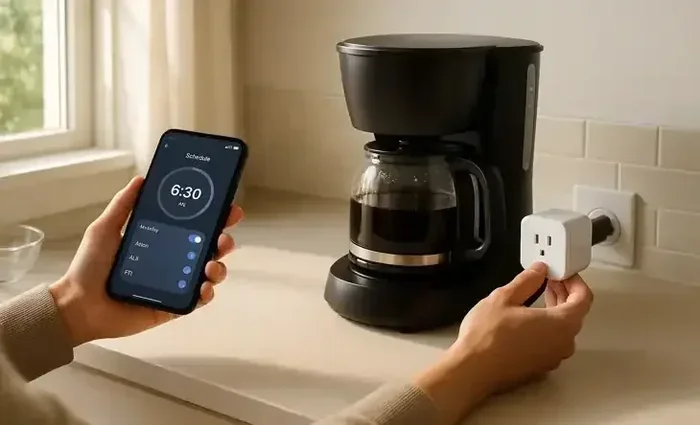
How To Use Smart Plug With Coffee Maker For Beginners
Using a smart plug with your coffee maker is one of the simplest ways to upgrade your morning routine. This guide walks you through choosing the right outlet, setting up your device, and programming automatic brew times. You will learn how to control your coffee maker from your phone, use voice commands, and save energy while enjoying fresh coffee every single day.
A fresh cup of coffee in the morning can set the tone for your entire day. Now imagine waking up to the smell of freshly brewed coffee without lifting a finger. That is exactly what happens when you connect a smart plug with coffee maker setup in your kitchen.
A smart plug is a small device that plugs into your wall outlet and turns any regular appliance into a smart, connected device. It is one of the easiest and most affordable ways to start building your smart home. Whether you have a drip coffee maker, a single-serve pod machine, or a French press with an electric kettle, a smart plug can add automation and convenience to your daily routine.
This guide is written for beginners who want to learn exactly how to set up and use a smart plug with their coffee maker. We will cover everything from choosing the right plug to programming your brew schedule and using voice commands. By the end, you will have all the knowledge you need to enjoy automated coffee brewing every morning.
Key Takeaways
- Smart plugs turn any regular coffee maker into a smart appliance: You can schedule brew times and control your machine remotely without buying a new coffee maker.
- Setup is simple and beginner-friendly: All you need is a compatible smart plug, your phone, and a WiFi connection to get started.
- Voice control adds hands-free convenience: Pair your smart plug with Alexa or Google Home to start brewing with just your voice.
- Safety matters: Always check your coffee maker’s wattage, avoid overloading outlets, and follow manufacturer guidelines to prevent hazards.
- Energy savings add up over time: A smart plug helps you avoid leaving your coffee maker on standby, which can reduce your electricity bill.
- Troubleshooting is straightforward: Most common issues with smart plugs and coffee makers have easy fixes you can do at home.
📑 Table of Contents
- What Is a Smart Plug and Why Use It With Your Coffee Maker
- How to Choose the Right Smart Plug for Your Coffee Maker
- Step-by-Step Setup Guide for Your Smart Plug and Coffee Maker
- Programming Your Morning Brew Schedule and Voice Control
- Safety Tips, Troubleshooting, and Common Mistakes
- Benefits of Using a Smart Plug With Your Coffee Maker
- Final Thoughts
What Is a Smart Plug and Why Use It With Your Coffee Maker
A smart plug is a compact device that sits between your wall outlet and your appliance. It connects to your home WiFi network and lets you control the power flowing to your device using a smartphone app. Think of it as a remote control switch for any plugged-in appliance.
So why pair a smart plug specifically with a coffee maker? Here are a few reasons that make this combination so popular:
- Morning automation: Set your coffee maker to start brewing 10 minutes before your alarm goes off. You wake up to the smell of fresh coffee without doing anything.
- Remote control: Forgot to turn on your coffee maker before leaving home? Open the app on your phone and start it from anywhere with an internet connection.
- Voice commands: If you have a smart speaker like Amazon Echo or Google Nest, you can start your coffee maker just by talking.
- Energy savings: Smart plugs let you completely cut power to your coffee maker when it is not in use, which stops phantom energy drain.
- No new appliance needed: You do not need to buy an expensive smart coffee maker. A simple plug transforms your existing machine.
The beauty of using a smart plug with your coffee maker is that it works with almost any model. As long as your coffee maker plugs into a standard wall outlet and its wattage stays within the plug’s limit, you are good to go. This makes it one of the most accessible smart home upgrades you can make.
How to Choose the Right Smart Plug for Your Coffee Maker
Not all smart plugs are the same. Before you buy one, there are a few important things to check so you get the right fit for your coffee maker.
Check the Wattage Rating
Every coffee maker uses a certain amount of power, measured in watts. Most drip coffee makers use between 600 and 1200 watts. Single-serve machines like Keurig typically use 200 to 1500 watts depending on the model. Your smart plug must be rated to handle the wattage of your specific machine.
Most standard smart plugs handle up to 15 amps or 1800 watts, which covers the vast majority of coffee makers. However, if you have a large commercial-style machine, double-check the specs before purchasing. You can usually find the wattage on a label at the back or bottom of your coffee maker.
Pick the Right Smart Plug Type
There are several types of smart plugs on the market. Here is a quick comparison to help you decide:
- WiFi plugs: Connect directly to your home WiFi network. These are the most popular choice because they do not need a separate hub. Brands like TP-Link Kasa, Wemo, and Amazon Smart Plug fall into this category.
- Bluetooth plugs: Connect to your phone via Bluetooth. These work well for short-range control but do not allow remote access when you are away from home.
- Zigbee or Z-Wave plugs: These need a hub to work. They are more reliable for larger smart home setups but add extra cost and complexity.
For most people using a smart plug with coffee maker setups, a WiFi plug is the best choice. It is simple, reliable, and gives you full remote access from anywhere.
Look for Useful Features
When shopping for a smart plug, look for these features that make your coffee brewing experience better:
- Scheduling: The ability to set on and off times down to the minute.
- Countdown timer: Lets you set the plug to turn off after a certain number of hours, which is great for preventing your coffee from overheating.
- Voice assistant support: Make sure the plug works with Alexa, Google Assistant, or Siri.
- Energy monitoring: Some plugs track how much energy your coffee maker uses, which helps you understand your power consumption.
Step-by-Step Setup Guide for Your Smart Plug and Coffee Maker
Setting up your smart plug with coffee maker is straightforward and usually takes less than 10 minutes. Follow these steps and you will be brewing on schedule in no time.
Step 1: Download the App
Every smart plug comes with a companion app. Download it from the App Store or Google Play Store before you begin. Popular apps include the TP-Link Kasa app, Wemo app, or Amazon Alexa app depending on your plug brand.
Step 2: Plug In the Smart Plug
Insert the smart plug into a wall outlet. Wait for the indicator light to blink, which means it is in pairing mode. If your plug came with a physical reset button, press it once to activate pairing mode.
Step 3: Connect to WiFi
Open the app and follow the on-screen instructions to connect the plug to your home WiFi network. Make sure you are using a 2.4 GHz network, as most smart plugs do not support 5 GHz WiFi. This is one of the most common setup issues, so double-check your router settings if the connection fails.
Step 4: Plug In Your Coffee Maker
Now plug your coffee maker into the smart plug. Make sure the connection is snug and secure. Turn on your coffee maker using its own power button to confirm it is receiving power through the smart plug.
Step 5: Name and Customize Your Device
In the app, give your smart plug a recognizable name like “Coffee Maker” or “Morning Brew.” This makes it easier to identify when you are controlling multiple smart devices. You can also assign it to a room in the app for better organization.
Once the setup is complete, you can control your coffee maker directly from the app. You can turn it on and off, set schedules, and even create custom routines. If you want to learn more about optimizing your kitchen appliances, you might also enjoy tips on how to use oven to reheat food for perfectly warmed meals throughout the day.
Programming Your Morning Brew Schedule and Voice Control
Now that your smart plug is set up, it is time to make your coffee maker truly smart. The scheduling feature is where the real magic happens.
Setting Up a Daily Brew Schedule
Most smart plug apps let you create a daily or weekly schedule. Here is how to set up your morning brew routine:
- Open the app and select your coffee maker smart plug.
- Tap on the “Schedule” or “Automation” option.
- Set the “On” time to 15 minutes before you usually wake up. This gives the coffee maker enough time to brew a full pot.
- Set the “Off” time to 30 minutes after the brew should be complete. This prevents your coffee from sitting on a hot plate too long.
- Save the schedule and test it by running a trial brew the evening before.
You can also set different schedules for different days of the week. For example, you might want your coffee maker to start earlier on weekdays and sleep in on weekends. Most apps let you customize this easily.
Using Voice Commands
If you have a smart speaker, you can take your coffee brewing to the next level. Simply link your smart plug to your voice assistant app:
- For Alexa: Open the Alexa app, go to Devices, and add your smart plug. Once connected, you can say “Alexa, turn on the coffee maker” or “Alexa, set a timer for the coffee maker.”
- For Google Home: Open the Google Home app, tap Add Device, and follow the prompts to connect your smart plug. Then say “Hey Google, turn on the coffee maker.”
- For Apple HomeKit: If your plug supports HomeKit, add it through the Home app and use Siri commands like “Hey Siri, turn on the coffee maker.”
Voice control is especially handy when your hands are full with breakfast prep or when you are still groggy in the morning. Just speak a simple command and your coffee maker starts brewing automatically. You can also create routines that chain multiple actions together, like turning on a kitchen light and starting the coffee maker at the same time.
Creating a Smart Morning Routine
Take your automation further by building a complete morning routine. Many smart plug apps and voice assistants let you create routines that trigger multiple devices at once. For instance, you can set a routine where at 6:30 AM, your bedroom light gently turns on, your smart plug powers the coffee maker, and your phone stops playing your alarm sound. This creates a seamless wake-up experience that feels effortless.
Some people also pair their smart plug setup with other kitchen tools. For example, if you use an electric kettle or hot water dispenser alongside your coffee maker, you can schedule both to turn on at the same time. The possibilities for customizing your kitchen automation are truly endless.
Safety Tips, Troubleshooting, and Common Mistakes
While using a smart plug with your coffee maker is very safe and simple, there are a few important things to keep in mind. Let us cover safety first, then common problems and how to fix them.
Safety Tips You Should Follow
- Never exceed the wattage limit: Check both your coffee maker and smart plug wattage ratings. Overloading a plug can cause overheating or even a fire hazard.
- Use a dedicated outlet: Plug your smart plug directly into a wall outlet, not into an extension cord or power strip. This ensures a stable connection and reduces heat buildup.
- Keep it away from water: Place the smart plug and coffee maker on a dry, stable surface away from the sink or any source of moisture.
- Inspect regularly: Periodically check the plug and cords for signs of wear, fraying, or damage. Replace any damaged components immediately.
- Follow manufacturer guidelines: Always read the user manual for both your smart plug and coffee maker. Some coffee makers have specific guidelines about leaving them on for extended periods.
Common Mistakes to Avoid
Here are some mistakes beginners often make when using a smart plug with their coffee maker:
- Forgetting to turn on the coffee maker manually first: Many coffee makers need to be manually turned on before the smart plug can power them on in a scheduled schedule. Make sure your coffee maker is in the on position before relying on the smart plug schedule.
- Setting the off timer too short: If you set the smart plug to turn off too early, your coffee might not finish brewing. Give your machine enough time to complete the full cycle.
- Using the wrong WiFi band: If your smart plug will not connect, check that you are using a 2.4 GHz network. Most smart plugs do not work with 5 GHz WiFi.
- Ignoring firmware updates: Keep your smart plug app updated to ensure you have the latest features and security patches.
Keeping your kitchen appliances clean is also important for their longevity. If you are interested in deep cleaning other small kitchen devices, you can find helpful guides on how to clean your Cosori air fryer toaster oven to keep everything running at peak performance.
Troubleshooting Common Issues
If something goes wrong, do not worry. Here are solutions to the most common problems:
- Smart plug not connecting to WiFi: Move the plug closer to your router. Make sure you are on a 2.4 GHz network. Restart both the plug and your router, then try pairing again.
- Coffee maker not turning on via the app: Check that the coffee maker is manually turned on at its own controls. Some machines require the power button to be in the on position before they respond to smart plug commands.
- Schedule not working: Double-check the time zone settings in your app. Also make sure your phone and smart plug are connected to the same WiFi network during setup.
- Delayed response: If your coffee maker takes a while to respond to commands, it may be a WiFi signal issue. A WiFi extender in your kitchen can help strengthen the connection.
For more information on keeping your kitchen appliances running smoothly, you might also want to explore how to make bread without oven and yeast using alternative kitchen tools that work alongside your smart devices.
Benefits of Using a Smart Plug With Your Coffee Maker
Now that you know how to set everything up, let us talk about why this small upgrade is so worthwhile. The benefits go far beyond just convenience.
Convenience and Time Savings
The biggest benefit is simply convenience. You no longer need to rush home or wake up early just to start your coffee maker. Your coffee is ready when you are, every single day. This alone can transform your morning routine and reduce daily stress.
Energy Efficiency
Coffee makers left on standby still consume electricity, even when they are not actively brewing. A smart plug completely cuts power when the schedule ends, which means your coffee maker uses zero standby power. Over weeks and months, this adds up to real energy savings on your electricity bill.
Extended Appliance Lifespan
Because your coffee maker turns off automatically after brewing, it runs for shorter total periods each day. This reduces wear and tear on the heating element and internal components, potentially extending the life of your machine.
Peace of Mind
Ever left home and wondered if you turned off the coffee maker? With a smart plug, you can check the app and turn it off remotely. This gives you peace of mind and helps prevent potential fire hazards from appliances left on unattended.
Using a smart plug with your coffee maker is one of those small changes that makes a big difference. It is affordable, easy to set up, and delivers immediate value every single morning. If you are new to smart home devices, this is the perfect place to start.
For those who love exploring kitchen automation, you might also enjoy learning about how to use quick bake on a Frigidaire oven to speed up other cooking tasks in your kitchen. Combining smart plugs with other smart kitchen tools creates a truly connected cooking experience.
Final Thoughts
Setting up a smart plug with your coffee maker is one of the easiest and most rewarding smart home projects you can start. It costs less than most people expect, takes only minutes to install, and delivers fresh, automated coffee every single morning. Whether you are a tech enthusiast or someone who just wants a simpler morning routine, a smart plug is the answer.
Start by choosing a compatible smart plug that matches your coffee maker’s wattage. Download the app, connect to WiFi, and set up your first brew schedule. Before long, the smell of freshly brewed coffee will greet you each morning without you ever having to lift a finger. The convenience, energy savings, and peace of mind are all real and immediate.
Take the step today. Your future self, standing in the kitchen sipping a perfectly timed cup of coffee, will thank you. Once you experience the difference a smart plug makes, you will wonder how you ever managed your mornings without one.
Frequently Asked Questions
Can I use any smart plug with any coffee maker?
Most smart plugs work with standard coffee makers as long as the wattage stays within the plug’s limit. Check the wattage rating on your coffee maker and make sure your smart plug can handle that load. Standard drip machines and single-serve pods generally work perfectly with any WiFi smart plug.
Will a smart plug damage my coffee maker?
No, a smart plug will not damage your coffee maker. It simply controls the flow of electricity to the appliance. As long as you stay within the wattage limits and use the plug as directed, your coffee maker will work exactly as it always has, just with added automation.
Can I control my coffee maker when I am not home?
Yes, as long as your smart plug is connected to WiFi and you have internet access on your phone. You can open the app from anywhere in the world and turn your coffee maker on or off. This is one of the biggest advantages of using a smart plug with your coffee maker.
Do I need a smart speaker to use a smart plug?
No, you do not need a smart speaker. You can control your smart plug entirely through the smartphone app. A smart speaker like Alexa or Google Home is optional and simply adds the convenience of voice control. You can always add a speaker later if you decide you want that feature.
How much does a smart plug cost?
Most smart plugs cost between $10 and $25, depending on the brand and features. Basic WiFi plugs from brands like TP-Link Kasa or Amazon Smart Plug are very affordable. Considering the convenience and energy savings they provide, they are an excellent value for any kitchen.
Can I use a smart plug with a French press or manual coffee maker?
Smart plugs work best with electric coffee makers that plug into a wall outlet. Manual French presses do not use electricity, so a smart plug would not help with those. However, if you use an electric kettle or hot water dispenser alongside a French press, a smart plug can automate heating your water on a schedule.